
Imagine working on an important computer project when suddenly the electricity goes OFF. The lights stop working, internet routers shut down, and machines become inactive. In homes, offices, hospitals, industries, and data centers, power outages can create serious problems, including data loss, production delays, and equipment damage. This is where power backup systems become extremely important.
Understanding power backup systems explained is essential for electrical students, engineers, technicians, and beginners because these systems provide continuous electrical power during outages or voltage problems. Modern life depends heavily on electricity, and even a few minutes of power interruption can affect homes, businesses, communication systems, and industrial operations.
The power backup systems explained working principle helps users understand how batteries, inverters, generators, and automatic transfer systems work together to maintain uninterrupted power supply. Learning about these systems also improves knowledge of electrical safety, energy management, and equipment protection.
In this article, you will learn everything about power backup systems, including working principles, types, components, advantages and disadvantages, applications, comparison, troubleshooting, selection guides, and future trends in backup power technology using simple and easy English.
What Are Power Backup Systems?
Power backup systems are electrical systems designed to provide electricity when the main utility power supply fails, becomes unstable, or is temporarily unavailable. Depending on the system, backup power may come from batteries, generators, or other energy-storage and power-generation sources.
In simple terms, a power backup system provides an alternative source of electricity so important electrical and electronic equipment can continue operating during a power outage.
Power backup systems are widely used in homes, offices, commercial buildings, industries, hospitals, data centers, and communication facilities where an interruption in electricity can cause inconvenience, equipment damage, data loss, or safety problems.
Simple Explanation of Power Backup Systems
A power backup system either stores electrical energy in advance or generates electricity when required. When the main power supply is available, the system may charge its batteries or remain ready to start a generator.
When the utility supply fails, the backup system supplies power to selected electrical loads.
Depending on the type of system, it can help maintain:
- Home lighting
- Fans and essential appliances
- Computers and networking equipment
- Industrial machines
- Communication systems
- Security equipment
- Emergency lighting
- Medical and critical equipment
The backup duration depends on factors such as system capacity, battery size, connected load, fuel availability, and equipment efficiency.
How Does a Power Backup System Work?
The basic operation can be explained in three stages:
1. Normal Power Supply
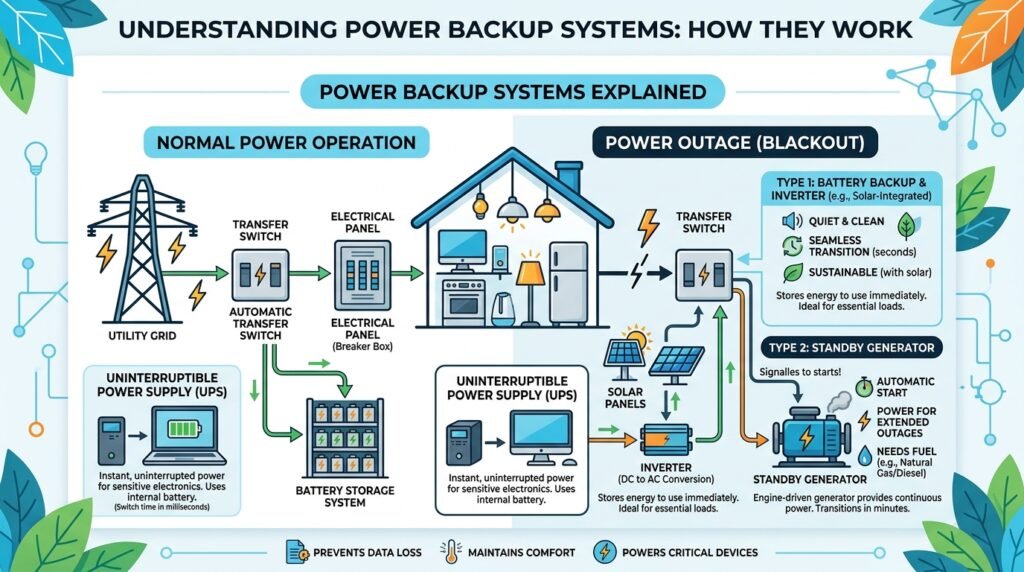
When utility electricity is available, the electrical loads receive power from the main supply. In battery-based systems, a charger can also charge the batteries.
2. Power Failure
When the main supply fails, the backup system detects the interruption. Depending on the system design, an inverter, UPS, or automatic transfer switch can transfer the required loads to the backup source.
3. Backup Power Supply
The backup source then provides electricity to the connected loads. In an inverter-based system, the battery provides DC power, which the inverter converts into AC power for appliances and other AC loads.
When utility power returns, the system can transfer the loads back to the main supply and recharge the batteries, depending on its design.
Practical Example: Home Inverter Power Backup System
A common example is a home inverter system used during power outages.
The basic process is:
Utility Supply → Battery Charger → Battery → Inverter → Home Loads
During normal operation:
- The utility supply powers the household loads.
- The charger charges the battery.
- The battery stores electrical energy for later use.
During a power outage:
- The battery supplies DC electrical energy.
- The inverter converts DC into AC.
- Essential appliances receive backup electricity.
For example, a properly sized system may keep lights, fans, a Wi-Fi router, and a computer operating during an outage, depending on the inverter capacity and battery energy available.
Key Components of a Power Backup System
A typical power backup system may include:
- Battery – Stores electrical energy.
- Inverter – Converts DC power into AC power.
- Battery charger – Recharges the battery.
- Transfer switch – Transfers loads between power sources in applicable systems.
- Control system – Monitors and manages system operation.
- Protection devices – Help protect against overcurrent, short circuits, overloads, and other electrical faults.
Different backup systems use different combinations of these components. For example, a standby generator system generates electricity instead of storing the required energy in batteries.
Why Are Power Backup Systems Important?
Power interruptions can affect both residential and industrial equipment. A reliable backup system helps maintain essential loads and reduces downtime.
In industrial and commercial environments, backup power can be especially important for:
Critical control systems
Production equipment
Servers and network systems
Security systems
Emergency lighting
Communication equipment
Power Backup System Working Principle


5
The power backup system working principle is based on providing an alternative source of electricity when the main utility supply fails or becomes unavailable. Depending on the system type, backup power can come from batteries, an inverter, a UPS, a standby generator, or a combination of these technologies.
During normal operation, the utility supply provides electricity to the connected loads. In a battery-based system, a charger or rectifier also charges the battery so stored energy is available when needed.
When a power failure occurs, the system detects the interruption and transfers the required loads to the backup source. In an inverter-based system, the battery supplies DC power to the inverter, which converts it into AC power for connected appliances and equipment.
When utility power returns, the system transfers the load back to the main supply and, where applicable, automatically recharges the battery.
This basic power backup system working principle helps maintain essential electrical services in homes, offices, hospitals, industries, data centers, communication facilities, and other locations where power interruption can cause problems.
Step-by-Step Working Process of a Power Backup System
1. Main Power Supply Operates Normally
Under normal conditions, electricity is supplied by the utility grid to the connected electrical loads.
In a battery-based backup power system, the charger simultaneously maintains the battery at an appropriate state of charge. The backup system remains ready to supply power if the utility supply fails.
The connected loads may include:
- Lights
- Fans
- Computers
- Routers
- Security systems
- Control equipment
- Essential industrial equipment
2. Backup System Monitors the Power Supply


5
A power backup system continuously monitors the incoming utility supply to detect interruptions and abnormal electrical conditions.
Depending on the system, monitoring may include:
- Input voltage
- Frequency
- Power interruption
- Overvoltage
- Undervoltage
- Phase conditions in applicable systems
If the system detects a power failure or a condition outside its operating limits, it activates the appropriate backup source.
A UPS may transfer to battery power very quickly, while a standby generator normally requires a starting and transfer sequence.
3. Power Failure Occurs
The main utility supply may become unavailable because of several reasons, including:
- Load shedding
- Utility faults
- Severe weather
- Equipment failure
- Damaged power lines
- Maintenance work
- Overloaded electrical networks
When the utility supply fails, the backup system detects the interruption and begins the transfer process.
4. Backup System Activates
The method used to provide backup power depends on the type of system.
In an inverter-based backup system, the battery supplies DC power to the inverter. The inverter then converts the DC power into AC power for suitable connected loads.
In a UPS system, the battery and inverter can provide power to critical equipment with very little interruption, depending on the UPS design.
In a standby generator system, an automatic transfer system can start the generator and transfer the selected loads after the generator reaches suitable operating conditions.
5. Stored or Generated Energy Powers the Load
Once backup power becomes available, the selected electrical loads receive electricity from the backup source.
For a battery-based system, the basic energy path is:
Battery → Inverter → AC Output → Electrical Loads
The available backup time depends on factors such as:
- Battery capacity
- Connected load
- Inverter efficiency
- Battery condition
- Operating temperature
- Depth of discharge
- System design
A larger load generally uses stored energy more quickly, reducing the available backup time.
6. Main Utility Supply Returns
When the utility supply returns to acceptable operating conditions, the backup system detects the restoration.
Depending on the system design, it then transfers the selected loads back to the utility supply.
In a battery-based system:
Utility Supply → Loads
The battery charger then restores the battery’s stored energy so the system is ready for the next power outage.
In a generator-based system, the generator normally continues for a short period before its controller shuts it down according to the configured transfer and shutdown sequence.
Simple Power Backup System Working Diagram
The basic operation of a battery inverter system can be understood as:
Utility Power → Charger → Battery → Inverter → Electrical Loads
During normal operation:
Utility Power → Electrical Loads
During a power failure:
Battery → Inverter → Electrical Loads
This simple sequence explains how a power backup system works and why batteries and inverters are commonly used together in residential and commercial backup systems.
Easy Analogy
Think of a power backup system like a reserve water tank.
- Main electricity supply = Normal water supply
- Battery = Reserve water tank
- Inverter = Equipment that makes stored water usable
- Electrical loads = Devices using the water
- Power failure = Main water supply stops
When the normal supply is available, everything operates normally and the battery is charged. When the main supply stops, the stored energy is used to keep essential equipment operating.
Key Factors That Affect Backup Performance
The performance of a power backup system depends on several factors.
Battery Capacity
A higher-capacity battery can generally store more energy and provide longer backup time, assuming the load and operating conditions remain suitable.
Connected Load
The amount of electrical power being consumed directly affects backup duration. Reducing unnecessary loads can extend the available backup time.
Inverter Capacity
The inverter must be properly sized for the connected load, including any starting or surge requirements of equipment such as motors and compressors.
Battery Condition
Battery age, temperature, maintenance, charging method, and usage history can affect available capacity and backup performance.
System Efficiency
Energy is lost during charging, conversion, and distribution. A more efficient system can deliver more of the stored energy to the connected load.
Transfer Time
For sensitive equipment, transfer time is important. UPS systems are commonly used where even a short interruption can affect computers, servers, communication equipment, or control systems.
Types of Power Backup Systems
Different types of power backup systems are designed to provide reliable electricity during power outages. The best system depends on the required backup time, connected load, power quality, installation environment, available energy sources, and budget.
Common power backup solutions include UPS systems, inverter backup systems, generator backup systems, solar backup systems, and hybrid power systems.
UPS (Uninterruptible Power Supply)


6
A UPS (Uninterruptible Power Supply) provides backup electricity to connected equipment when the main power supply fails. Unlike a basic standby system, a UPS is designed to provide very fast or continuous transfer to its internal energy source, depending on the UPS topology.
A UPS normally includes a battery, charger, inverter, control system, and protection circuits.
Features of a UPS
- Very fast transfer or continuous power in online UPS designs
- Battery-based backup
- Protects sensitive electronic equipment
- Can provide voltage and power-quality conditioning depending on the UPS type
- Suitable for critical loads
Applications of UPS Systems
- Computers
- Servers
- Data centers
- Medical equipment
- Networking equipment
- Security systems
- Industrial control systems
Inverter Backup System


5
An inverter backup system is a common battery-based power backup solution used to provide electricity during utility power outages.
During normal operation, the utility supply powers the connected loads and charges the battery through a charger. When the main supply fails, the inverter takes energy from the battery and converts DC (Direct Current) into AC (Alternating Current) for suitable electrical loads.
When utility power returns, the system transfers the loads back to the main supply and recharges the battery.
Features of an Inverter Backup System
- Common residential backup solution
- Uses rechargeable batteries
- Suitable for essential household loads
- Different inverter capacities are available
- Backup duration depends on battery capacity and connected load
- Can be relatively simple to install when properly designed
Applications of Inverter Backup Systems
- Homes
- Small offices
- Shops
- Schools
- Small commercial facilities
- Essential lighting and appliance circuits
Generator Backup System


5
A generator backup system uses an engine-driven generator to produce electrical power when the utility supply fails. The engine normally runs on a fuel such as diesel or natural gas, depending on the generator design.
A standby generator can be connected through an Automatic Transfer Switch (ATS), which transfers selected loads from the utility supply to the generator after the generator reaches suitable operating conditions.
Features of Generator Backup Systems
- High power output
- Suitable for large electrical loads
- Can provide extended backup when adequate fuel is available
- Available in residential, commercial, and industrial capacities
- Suitable for applications where batteries alone cannot provide the required backup duration
Applications of Generator Backup Systems
- Industrial facilities
- Hospitals
- Commercial buildings
- Construction sites
- Large offices
- Data centers
- Emergency power systems
Solar Backup System


5
A solar backup system combines solar panels, an inverter, battery storage, and associated control and protection equipment to provide electrical power.
Solar panels generate DC electricity from sunlight. Depending on the system design, the energy can supply loads, charge the battery, or be converted into AC power through an inverter.
During a power outage, the battery and inverter can supply backup power to supported loads.
Features of Solar Backup Systems
- Uses renewable solar energy
- Can reduce dependence on grid electricity
- Provides battery-based backup when properly configured
- Can be combined with grid power
- Useful for reducing operating costs in suitable applications
- Requires appropriate system sizing and installation
Applications of Solar Backup Systems
- Homes
- Remote locations
- Small businesses
- Solar-plus-storage systems
- Hybrid renewable energy installations
- Off-grid electrical systems
Hybrid Power Backup System


6
A hybrid power backup system combines two or more energy sources to improve reliability and flexibility. For example, a hybrid system may combine solar panels, batteries, utility power, and a generator.
An intelligent control system determines how available energy sources are used according to system settings, load demand, battery condition, and other operating conditions.
Features of Hybrid Power Backup Systems
- Multiple energy sources
- Flexible power management
- Improved energy availability
- Battery storage capability
- Can integrate renewable energy
- Suitable for systems with changing power requirements
Applications of Hybrid Power Systems
- Modern homes
- Commercial buildings
- Industrial facilities
- Remote installations
- Renewable energy projects
- Microgrids
Main Components of Power Backup Systems
Understanding power backup system components is important for proper installation, troubleshooting, maintenance, and system selection.
The exact components vary according to whether the system uses batteries, generators, solar energy, or a combination of sources.
Battery Bank
A battery bank stores electrical energy for use during a power outage. Battery capacity is commonly specified in ampere-hours (Ah), while the actual available backup energy depends on factors such as voltage, capacity, discharge conditions, temperature, age, and battery chemistry.
Common Battery Types
- Lead-acid batteries
- Lithium-ion batteries
- Lithium iron phosphate (LiFePO₄) batteries
- AGM batteries
- Gel batteries
The battery type should be selected according to the backup system, required runtime, charging method, operating environment, and manufacturer specifications.
Inverter
An inverter converts DC electrical power from a battery or other DC source into AC power for compatible electrical loads.
The inverter must be correctly sized according to the continuous load and, where applicable, the starting or surge requirements of equipment such as motors, refrigerators, pumps, and air conditioners.
Main Inverter Functions
- DC-to-AC conversion
- Voltage regulation in applicable designs
- Load power delivery
- Battery protection and monitoring in some systems
- Integration with solar or grid systems in hybrid designs
UPS System Controller
The UPS controller monitors system conditions and controls important functions such as power-source transfer, battery charging, protection, alarms, and inverter operation.
In modern UPS systems, electronic control systems continuously monitor voltage, frequency, battery condition, load level, and fault conditions.
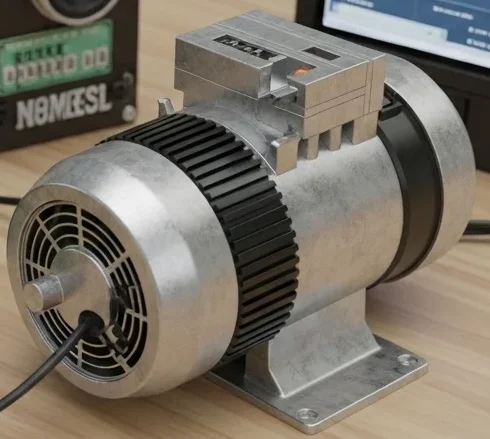
Generator Engine and Alternator
A generator backup system uses an engine and alternator to produce electrical power.
The engine provides mechanical energy, while the alternator converts that mechanical energy into electrical energy.
A complete generator system may also include:
- Fuel system
- Cooling system
- Lubrication system
- Starting system
- Control panel
- Exhaust system
- Battery for engine starting
Automatic Transfer Switch (ATS)
An Automatic Transfer Switch (ATS) automatically transfers selected electrical loads between two power sources, such as the utility supply and a standby generator.
A typical sequence is:
Utility Supply → ATS → Loads
During an outage:
Generator → ATS → Loads
The ATS helps ensure that the load is connected to the appropriate available source while preventing an incorrect connection between incompatible power sources.
Battery Charger
A battery charger restores energy to the battery when the utility supply or another suitable power source is available.
The charger should provide the correct charging voltage and current for the specific battery chemistry and system design.
Incorrect charging conditions can reduce battery life or create safety problems.
Solar Charge Controller
In solar battery systems, a solar charge controller regulates power from solar panels to the battery when a separate controller is used.
Common technologies include:
- PWM charge controllers
- MPPT charge controllers
An MPPT controller can improve energy harvesting under suitable operating conditions by adjusting the operating point of the solar array.
Protection Devices
Protection devices help protect power backup systems and connected equipment from electrical faults and abnormal operating conditions.
Common Protection Devices
- Circuit breakers
- Fuses
- Surge protective devices
- Overload protection
- Short-circuit protection
- Battery protection devices
- Ground-fault protection where applicable
Proper protection must be selected according to the system voltage, current, battery type, fault levels, equipment specifications, and applicable electrical standards.
Power Backup System Components at a Glance
| Component | Main Function |
|---|---|
| Battery Bank | Stores electrical energy |
| Inverter | Converts DC power into AC power |
| UPS Controller | Manages UPS operation and monitoring |
| Generator | Produces electrical power |
| ATS | Transfers loads between power sources |
| Battery Charger | Recharges batteries |
| Solar Charge Controller | Regulates solar charging |
| Protection Devices | Protect equipment from electrical faults |
Advantages
Understanding power backup systems explained advantages and disadvantages helps users select suitable systems.
Advantages of Power Backup Systems
Provides uninterrupted power supply
Protects sensitive equipment
Prevents data loss
Improves industrial productivity
Supports emergency systems
Enhances electrical reliability
Reduces downtime
Maintains communication systems
Improves safety during outages
Supports remote and off-grid applications
Disadvantages / Limitations
Although power backup systems are highly useful, they also have some limitations.
Disadvantages of Power Backup Systems
High installation cost
Battery maintenance required
Limited backup duration in small systems
Fuel cost for generators
Noise pollution from generators
Requires regular testing
Battery replacement expenses
Space requirement for large systems
Power Backup Systems Explained Applications
Power backup systems explained applications are found in almost every sector.
Home Applications
Lighting backup
Refrigerator operation
Wi-Fi router support
Fan and TV backup
Commercial Applications
Office systems
Retail stores
Shopping centers
Industrial Applications
Factory machinery
Production lines
Automation systems
Medical Applications
Hospital emergency systems
ICU equipment
Laboratory systems
Modern Technology Applications
Data centers
Telecom towers
Smart homes
Renewable energy systems
Comparison Section
Difference Between UPS and Inverter
| Feature | UPS | Inverter |
| Switching Time | Instant | Slight delay |
| Main Use | Sensitive electronics | General appliances |
| Backup Duration | Short to medium | Medium to long |
| Cost | Higher | Lower |
| Output Stability | Very stable | Moderate stability |
| Battery System | Built-in | External batteries |
| Applications | Computers, servers | Homes, offices |
Selection Guide for Power Backup Systems
Choosing the right power backup system depends on several factors, including the connected electrical load, required backup time, power quality, installation location, budget, and available energy source.
Before selecting a system, calculate the total load and decide which equipment must remain operational during a power outage.
Choose a UPS When
A UPS (Uninterruptible Power Supply) is a good choice when equipment requires fast or continuous backup power and protection from power disturbances.
Choose a UPS when:
- Computers or servers require reliable backup.
- Sensitive electronic equipment is being used.
- Very short interruptions can cause problems.
- Networking and communication equipment must remain operational.
- Critical control or medical equipment requires suitable power protection.
Choose an Inverter Backup System When
An inverter backup system is suitable for homes, shops, and small offices where essential appliances need backup power during outages.
Choose an inverter system when:
- Household backup power is required.
- Lights, fans, routers, and other essential loads need support.
- Moderate backup capacity is sufficient.
- Battery-based backup is preferred.
- A practical and scalable backup solution is required.
The inverter and battery should be sized according to the continuous load and the starting requirements of appliances such as refrigerators, pumps, and motors.
Choose a Generator Backup System When
A generator backup system is suitable when the required power level or backup duration is too large for a battery-only system.
Choose a generator when:
- Heavy electrical loads need backup.
- Long-duration backup is required.
- Industrial or commercial equipment must continue operating.
- High starting currents are present.
- Fuel-based standby power is practical for the installation.
Choose a Solar Backup System When
A solar backup system is useful when renewable energy and battery storage are part of the power strategy.
Choose solar backup when:
- Renewable energy is preferred.
- Solar energy can reduce grid electricity consumption.
- Battery storage is required for outages.
- The system is installed in a location with suitable solar resources.
- Grid independence or reduced grid dependence is an objective.
Choose a Hybrid Power Backup System When
A hybrid power backup system is suitable when multiple energy sources need to work together.
A hybrid system may combine:
- Utility power
- Solar panels
- Battery storage
- Generator power
Hybrid systems are useful when flexibility, energy management, and backup reliability are important.
Tips for Selecting and Using Power Backup Systems
Calculate the Electrical Load Correctly
Before selecting a power backup system, calculate the total power requirement of the equipment that must operate during an outage.
Consider:
- Running power
- Starting or surge power
- Total connected load
- Required backup duration
- Future load expansion
Do not select a backup system based only on the number of appliances. Their actual power consumption must also be considered.
Select the Correct Battery Capacity
Battery capacity has a major effect on backup duration.
A larger battery can generally provide more stored energy, but backup time also depends on the connected load, battery condition, temperature, discharge limits, and inverter efficiency.
Always select a battery according to the manufacturer’s specifications and the requirements of the backup system.
Select the Correct Inverter Capacity
The inverter should be capable of handling the expected continuous load and any temporary starting surge.
This is particularly important when the backup system supplies:
- Refrigerators
- Air conditioners
- Pumps
- Motors
- Compressors
An undersized inverter may overload, shut down, or operate unreliably.
Install Proper Grounding and Bonding
Proper grounding and bonding are important parts of electrical safety.
The backup system should be installed according to the manufacturer’s instructions and applicable electrical codes. Grounding requirements can differ depending on whether the system is an inverter, UPS, generator, or hybrid installation.
Maintain Batteries Regularly
Proper battery maintenance improves reliability and can help extend service life.
For applicable battery systems:
- Check battery condition.
- Inspect terminals and connections.
- Keep batteries within recommended operating temperatures.
- Follow the correct charging procedure.
- Look for swelling, leakage, corrosion, or physical damage.
- Replace batteries when they no longer provide adequate capacity.
Lithium batteries may require less routine maintenance than some lead-acid batteries, but they still require appropriate monitoring and protection.
Use Quality Protection Devices
Protection devices help protect the backup system and connected equipment from abnormal electrical conditions.
Depending on the installation, protection may include:
- Circuit breakers
- Fuses
- Surge protective devices
- Overload protection
- Short-circuit protection
- Battery protection
Protection devices must be correctly rated for the system voltage, current, and fault conditions.
Common Power Backup System Problems and Solutions
Troubleshooting a power backup system starts with identifying whether the problem is related to the battery, inverter, generator, wiring, protection devices, or connected load.
Why Is the Backup System Not Starting?
A backup system may fail to start because of a discharged battery, loose connection, blown fuse, protection shutdown, or internal fault.
Common Causes
- Battery voltage is too low.
- Battery is damaged or disconnected.
- Loose battery or power connections.
- Blown fuse or tripped circuit breaker.
- System protection has activated.
- Internal equipment fault.
Solution
- Check the battery voltage according to the manufacturer’s procedure.
- Inspect cables and terminals.
- Check fuses and circuit breakers.
- Verify that the system is not overloaded.
- Check the system’s fault indicators or display.
- Contact a qualified technician if an internal fault is suspected.
Why Is the Backup Duration Very Short?
Short backup time is commonly caused by an aging battery, excessive connected load, insufficient battery capacity, or reduced battery performance.
Common Causes
- Old or degraded battery
- Excessive connected load
- Incorrect battery capacity
- High-temperature operation
- Poor charging
- Increased power consumption
Solution
- Test battery condition and capacity.
- Reduce unnecessary loads.
- Check the charging system.
- Verify the battery bank size.
- Replace batteries that have reached the end of their useful service life.
Why Does the Inverter Overheat?
An inverter may overheat when it operates under excessive load or when heat cannot escape properly.
Common Causes
- Overloading
- Blocked ventilation
- High ambient temperature
- Dust accumulation
- Poor installation location
- Internal fault
Solution
- Reduce the connected load.
- Ensure adequate airflow around the inverter.
- Keep ventilation openings clear.
- Install the unit according to the manufacturer’s environmental requirements.
- Investigate abnormal heating rather than continuing operation under unsafe conditions.
Why Does the Generator Fail to Start?
A standby generator may fail to start because of fuel, starting-battery, control, or engine-related problems.
Common Causes
- Low or contaminated fuel
- Weak starter battery
- Loose battery connections
- Faulty starting system
- Low engine oil or protective shutdown
- Control-system fault
Solution
- Check the fuel supply.
- Inspect the starter battery.
- Check battery connections.
- Review generator fault indicators.
- Verify required oil and coolant levels according to the manufacturer’s instructions.
- Have qualified personnel inspect persistent starting problems.
Why Is the UPS Beeping Continuously?
Continuous UPS beeping is usually an indication that the system has detected a condition requiring attention. The exact meaning depends on the UPS model.
Common Causes
- Overload
- Low battery
- Battery failure
- Overtemperature
- Utility power failure
- Internal fault
Solution
- Check the UPS display or alarm code.
- Remove unnecessary loads if an overload is indicated.
- Check battery condition.
- Ensure proper ventilation.
- Follow the manufacturer’s troubleshooting instructions.
Important: Do not assume that every UPS beep means a battery problem. Alarm patterns vary between manufacturers and models.
Future Trends in Power Backup Systems
Modern power backup systems are becoming smarter, more efficient, and increasingly integrated with renewable energy and digital monitoring technologies.
Smart Power Backup Systems
Modern backup systems increasingly include intelligent monitoring and control features.
These systems may support:
- Mobile monitoring
- Remote control
- Automatic alarms
- Battery health monitoring
- Performance tracking
- Fault diagnostics
These features make it easier to identify problems before they cause major downtime.
Lithium-Ion Battery Technology
Lithium-based batteries are becoming increasingly common in modern energy-storage applications.
Potential advantages include:
- High energy density
- Fast charging capability in suitable systems
- Long cycle life
- Lower routine maintenance compared with some lead-acid technologies
- Compact installation
Actual performance depends on battery chemistry, operating conditions, charging system, and manufacturer specifications.
Renewable Energy Integration
Solar power and battery storage are increasingly being combined to create more flexible solar backup systems.
A typical system may use:
Solar Panels → Charge Controller/Hybrid Inverter → Battery → Electrical Loads
The exact configuration depends on the system design.
AI-Based Power Management
Advanced power systems may use data analytics and AI-based control to improve energy management.
Potential applications include:
- Load forecasting
- Battery performance analysis
- Fault prediction
- Energy optimization
- Predictive maintenance
AI-based features should be considered an enhancement to system monitoring and control rather than a replacement for proper electrical protection and maintenance.
IoT-Based Backup System Monitoring
Internet-connected backup systems can provide real-time information about system performance.
Users may be able to monitor:
- Battery status
- Load level
- Input and output voltage
- Energy consumption
- Fault conditions
- Runtime information
Remote monitoring can be especially useful for commercial facilities, industrial sites, communication systems, and distributed renewable-energy installations.
More Efficient Energy Storage
Future power backup systems are expected to focus increasingly on higher efficiency, better battery management, improved power electronics, and integration with renewable energy sources.
Conclusion
Understanding power backup systems explained is essential for electrical students, engineers, technicians, and beginners working with modern electrical systems. Power backup systems provide reliable electricity during outages and protect homes, industries, hospitals, offices, and communication systems from power interruptions.
The power backup systems explained working principle helps users understand how batteries, inverters, UPS units, generators, and control systems work together to maintain continuous power supply. Different backup technologies are available for different applications, ranging from small household systems to large industrial power solutions.
As electrical technology continues to advance, smart backup systems, renewable energy integration, lithium-ion storage, and AI-based energy management are becoming more common. Learning about backup power systems improves practical electrical knowledge and helps users design safer, more reliable, and energy-efficient power solutions.