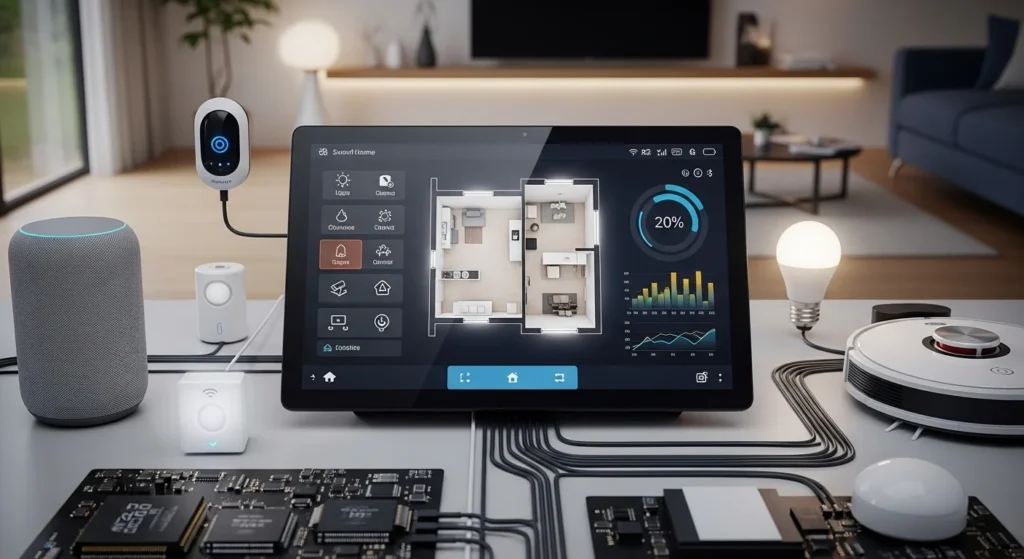

Imagine coming home after a long day and your lights automatically turn on, the fan starts running, and your security system activates without touching a single switch. This is not science fiction; it is the real-world application of a Home Automation Project.
Today, smart homes are becoming increasingly popular because people want more convenience, safety, and energy efficiency. Electrical engineers and students play a key role in designing and developing these systems, making it an important topic in modern electrical engineering.
A Home Automation Project allows users to control electrical appliances such as lights, fans, air conditioners, and security systems automatically or remotely using sensors, mobile apps, or controllers.
In this article, you will learn the working principle, types, components, advantages, disadvantages, and real-world applications of home automation systems in a simple and beginner-friendly way.
2. What Is a Home Automation Project?
A Home Automation Project is a smart electrical system that automatically monitors and controls household appliances using sensors, controllers, communication technologies, and automation software. It allows users to operate devices such as lights, fans, air conditioners, doors, security systems, and home appliances either automatically based on sensor inputs or remotely through a smartphone, tablet, voice assistant, or computer.
The main objective of a home automation project is to improve comfort, convenience, energy efficiency, security, and safety while reducing manual operation. Modern home automation systems can also provide real-time monitoring, remote notifications, and scheduling features, making homes smarter and more efficient.
Whether it is a simple automatic lighting system or a fully connected smart home, home automation combines electronics, electrical engineering, IoT (Internet of Things), and wireless communication technologies to create an intelligent living environment.
Simple Definition
A Home Automation Project is a smart system that automatically or remotely controls electrical appliances and home devices using sensors, controllers, and communication technologies. It enables homeowners to manage lighting, fans, HVAC systems, security devices, and other appliances with minimal human intervention.
Simple Explanation
Think of a smart home as a house that can make decisions on its own. Instead of manually switching lights on or off, adjusting the thermostat, or locking doors, the automation system performs these tasks automatically based on sensor inputs, schedules, or commands from a mobile app or voice assistant.
Sensors continuously monitor environmental conditions such as motion, temperature, light intensity, humidity, or smoke. The controller processes this information and sends commands to the connected devices, allowing the home to respond intelligently to changing conditions.
Practical Example
Imagine entering your home at night.
- A motion sensor detects your movement.
- The sensor sends a signal to the smart controller.
- The controller checks that it is nighttime.
- The living room lights turn on automatically.
- If no movement is detected for several minutes, the controller switches the lights off to save electricity.
Similarly, if a smoke sensor detects fire, the system can activate an alarm, send a notification to your smartphone, and even switch off the main electrical supply for safety.
3. Home Automation Project Working Principle: How It Works Step by Step
The Home Automation Project Working Principle is based on four main processes: sensing, processing, communication, and control. Sensors collect information from the surrounding environment, controllers process the data according to programmed instructions, and output devices perform the required actions automatically.
Modern home automation systems may use Wi-Fi, Bluetooth, Zigbee, Z-Wave, GSM, or IoT cloud platforms to enable remote monitoring and control from anywhere in the world.
Step-by-Step Working Process
Step 1: Input Detection (Sensing Stage)
The automation process begins with sensors continuously monitoring the home environment. These sensors detect physical changes and convert them into electrical signals.
Common sensors include:
- Motion (PIR) sensors
- Light sensors (LDR)
- Temperature sensors
- Humidity sensors
- Smoke and fire sensors
- Gas leakage sensors
- Door and window sensors
- Water level sensors
- Rain sensors
Example:
A motion sensor detects someone entering a room and immediately sends a signal to the controller.
Step 2: Signal Processing
The electrical signal generated by the sensor is sent to the controller, which acts as the brain of the automation system.
Common controllers include:
- Arduino
- Raspberry Pi
- PLC (Programmable Logic Controller)
- ESP32
- ESP8266 (NodeMCU)
- Smart home hubs
The controller receives data from multiple sensors simultaneously and analyzes it according to the programmed logic.
Step 3: Decision Making
After processing the input data, the controller decides what action should be performed.
The decision depends on:
- User-defined programming
- Sensor readings
- Time schedules
- Security conditions
- Temperature settings
- Voice commands
- Mobile application commands
Example:
If the room temperature rises above 28°C, the controller automatically turns on the air conditioner.
Step 4: Output Control
Once the decision is made, the controller sends commands to the output devices through relays, smart switches, or motor drivers.
Common output devices include:
- Relay modules
- Smart switches
- Motor drivers
- Servo motors
- LED drivers
- Smart plugs
These devices safely control high-voltage household appliances.
Step 5: Device Operation
The connected appliances perform the required operation automatically.
Examples include:
- Lights turn ON or OFF
- Fans start or stop
- Air conditioner adjusts temperature
- Curtains open or close automatically
- Doors lock or unlock
- Security alarms activate
- Garden irrigation system starts
- Water pumps operate automatically
The system continues monitoring sensors and repeats the automation cycle continuously.
Easy Analogy
Understanding a home automation project becomes much easier when compared to the human body.
| Home Automation Component | Human Body Equivalent | Function |
|---|---|---|
| Sensors | Human senses (eyes, ears, skin) | Detect changes in the environment |
| Controller (Arduino/PLC/Raspberry Pi) | Brain | Processes information and makes decisions |
| Communication Network | Nervous system | Transfers signals between devices |
| Relays and Smart Switches | Muscles | Carry out commands from the controller |
| Electrical Appliances | Hands and legs | Perform the required action |
Working Example
When a person enters a room:
- Sensors (Eyes) detect movement.
- Controller (Brain) processes the information.
- Communication Network (Nerves) sends commands.
- Relay (Muscles) activates the electrical circuit.
- Light (Hands) turns ON automatically.
This simple sequence explains how a home automation system continuously senses, thinks, and acts to make a home smarter, safer, and more energy-efficient.
4. Types of Home Automation Systems
Home automation systems can be classified based on the communication technology used between smart devices, sensors, and controllers. Each type has its own advantages, limitations, installation requirements, and ideal applications.
Choosing the right home automation system depends on factors such as the size of the house, budget, required features, future expansion, and ease of installation.
The most common types of home automation systems are discussed below.
4.1 Wired Home Automation System
A Wired Home Automation System uses physical communication cables to connect sensors, controllers, switches, actuators, and smart devices throughout the house. All devices communicate through dedicated wiring instead of wireless signals, making the system highly reliable and secure.
This type of automation is commonly installed during the construction of new homes, commercial buildings, hotels, and offices because wiring can be concealed inside walls and ceilings.
Since communication takes place through cables, wired systems are less affected by signal interference and provide stable performance even in environments where wireless communication is unreliable.
How It Works
In a wired home automation system:
- Sensors detect environmental changes such as motion, light, or temperature.
- The sensor sends signals through communication cables.
- The controller receives and processes the information.
- Based on the programmed logic, the controller sends commands through the wiring network.
- Relays or smart switches operate the connected electrical appliances automatically.
Main Components
A typical wired home automation system consists of:
- Central controller (PLC, Arduino, Raspberry Pi, or smart hub)
- Motion sensors
- Temperature sensors
- Light sensors
- Relay modules
- Smart switches
- Communication cables
- Power supply
- Security devices
- Electrical appliances
Features
- Highly reliable communication
- Fast response time
- Stable data transmission
- Excellent security against unauthorized access
- No wireless signal interference
- Supports large automation systems
- Long service life
- Suitable for continuous operation
Advantages
- Very reliable communication with minimal signal loss
- High-speed data transmission
- Strong cybersecurity because communication is cable-based
- Immune to Wi-Fi interference and radio frequency disturbances
- Suitable for large homes, commercial buildings, and industrial automation
- Requires very little ongoing maintenance after installation
- Can support a large number of connected devices
Limitations
- Installation is time-consuming and labor-intensive
- Higher initial installation cost due to wiring
- Difficult to modify after construction is complete
- Expansion requires additional cabling
- Less flexible compared to wireless systems
- Not ideal for existing homes unless major renovation is planned
Applications
Wired home automation systems are commonly used in:
- Luxury smart homes
- Newly constructed residential buildings
- Villas
- Hotels
- Office buildings
- Hospitals
- Educational institutions
- Industrial control systems
- Commercial complexes
Practical Example
A newly constructed smart home is equipped with motion sensors, smart lighting, security cameras, and automatic curtains. All devices are connected to a central controller using communication cables installed inside the walls.
When a person enters the living room, the motion sensor sends a signal through the wired network to the controller. The controller immediately switches on the lights, adjusts the room temperature, and opens the curtains if natural daylight is available. Because the entire system communicates through dedicated cables, it operates quickly, reliably, and without wireless interference.
4.2 Wireless Home Automation System
A Wireless Home Automation System uses wireless communication technologies to connect smart devices, sensors, controllers, and appliances without the need for physical communication cables. Instead of wired connections, devices communicate through technologies such as Wi-Fi, Bluetooth, Zigbee, Z-Wave, RF (Radio Frequency), and Thread.
Wireless home automation is the most popular choice for modern homes because it is easy to install, cost-effective, and highly flexible. Most wireless systems can be controlled remotely through a smartphone app, tablet, computer, or voice assistants like Amazon Alexa, Google Assistant, and Apple Siri.
Since no additional wiring is required, wireless automation is ideal for both new and existing homes where installing cables would be expensive or impractical.
How It Works
The working process of a wireless home automation system includes the following steps:
- Sensors detect environmental changes such as motion, light, temperature, or smoke.
- The sensors transmit data wirelessly to the central controller or smart hub.
- The controller processes the received information according to the programmed settings.
- Commands are sent wirelessly to smart switches, relays, or connected appliances.
- The appliances perform the required action, such as turning lights ON/OFF, adjusting the thermostat, or locking doors.
Many wireless systems also allow users to monitor and control devices remotely through cloud-based mobile applications.
Common Wireless Technologies
Wireless home automation systems commonly use:
- Wi-Fi
- Bluetooth
- Zigbee
- Z-Wave
- Thread
- RF (Radio Frequency)
- GSM and LTE (for remote monitoring)
- Internet of Things (IoT) platforms
Main Components
A wireless home automation system typically includes:
- Smart controller or hub
- Wireless sensors
- Smart switches
- Smart plugs
- Relay modules
- Wireless security cameras
- Smart locks
- Mobile application
- Internet router (for Wi-Fi-based systems)
Features
- Wireless communication between devices
- Quick and easy installation
- Smartphone and tablet control
- Voice assistant compatibility
- Remote monitoring from anywhere
- Flexible expansion by adding new smart devices
- Cloud-based automation and scheduling
- Real-time notifications and alerts
Advantages
- No additional wiring required
- Easy installation in existing homes
- Lower installation cost compared to wired systems
- Simple to expand by adding new smart devices
- Remote control from anywhere using the internet
- Supports voice control through smart assistants
- Easy software updates and automation customization
- Ideal for apartments and rental homes
Limitations
- Performance depends on wireless signal strength
- Internet outages may affect remote access
- Wireless interference can reduce communication reliability
- Requires proper network security to prevent unauthorized access
- Battery-powered sensors require periodic battery replacement
- Large homes may require additional Wi-Fi extenders or mesh networks
Applications
Wireless home automation systems are widely used in:
- Smart homes
- Apartments
- Villas
- Offices
- Hotels
- Retail stores
- Home security systems
- Smart lighting systems
- Energy management systems
- Elderly and healthcare monitoring
Practical Example
A homeowner installs smart Wi-Fi bulbs, wireless motion sensors, a smart thermostat, and a smart door lock. All devices are connected through the home’s Wi-Fi network and managed using a mobile application.
When the homeowner leaves the house, they can remotely turn off all lights, lock the doors, adjust the air conditioner, and monitor security cameras from their smartphone. If a motion sensor detects unexpected movement while the house is empty, the system immediately sends a notification to the user’s phone, allowing quick action from anywhere in the world.
4.3 Centralized Home Automation System
A Centralized Home Automation System is a smart home setup in which all sensors, switches, appliances, and smart devices are controlled by a single central controller or hub. This controller acts as the brain of the entire system, receiving information from connected devices, processing it, and sending commands to perform the required actions.
Because all automation is managed from one location, centralized systems are easy to configure, monitor, and maintain. They are commonly used in smart homes, luxury villas, hotels, office buildings, and commercial facilities, where centralized control and monitoring are important.
The controller may be a dedicated smart home hub, PLC (Programmable Logic Controller), Raspberry Pi, industrial controller, or cloud-connected automation server.
How It Works
The working process of a centralized home automation system is simple and efficient:
- Sensors detect changes such as motion, temperature, light, smoke, or door status.
- The sensor sends data to the central controller.
- The controller processes the information according to the programmed rules.
- The controller sends commands to relays, smart switches, or actuators.
- Connected appliances perform the required action automatically.
Since every device communicates with the same controller, all automation tasks are coordinated from one central point.
Main Components
A centralized home automation system generally includes:
- Central controller or smart hub
- Motion sensors
- Light sensors
- Temperature and humidity sensors
- Smart switches
- Relay modules
- Security cameras
- Smart door locks
- Communication network (wired or wireless)
- Mobile application or control panel
Features
- Single controller manages the entire home
- Centralized monitoring and control
- Simple system architecture
- Easy device management
- Supports automation schedules and scenes
- Remote access through mobile applications
- Real-time monitoring and notifications
- Integration with voice assistants and IoT devices
Advantages
- Easy to control all devices from one interface
- Simple installation and system configuration
- Centralized management of lighting, security, HVAC, and appliances
- Easier troubleshooting and maintenance
- Supports advanced automation scenarios
- Convenient remote monitoring and control
- Suitable for large homes and commercial buildings
Limitations
- The entire system depends on a single controller.
- If the central controller fails, many or all automation functions may stop working.
- Upgrading the controller can be expensive.
- A hardware or software failure can affect multiple connected devices.
- Regular backups and maintenance are important to ensure reliable operation.
Applications
Centralized home automation systems are widely used in:
- Luxury smart homes
- Villas
- Apartments
- Hotels
- Office buildings
- Hospitals
- Shopping malls
- Conference rooms
- Educational institutions
- Building management systems (BMS)
Practical Example
A luxury villa uses a centralized smart home controller to manage lighting, air conditioning, security cameras, door locks, curtains, and garden irrigation.
When the homeowner selects the “Away Mode” on the mobile app, the central controller automatically turns off all lights, switches off unnecessary electrical appliances, locks every door, adjusts the air conditioner to energy-saving mode, closes the curtains, activates the security system, and begins monitoring the property. All these actions are performed through a single controller, providing convenient and efficient home management.
Example Scenario: If the central controller stops working because of a hardware fault or power failure, most of the connected smart devices will no longer receive commands until the controller is repaired or replaced. This is the primary limitation of a centralized home automation system.
4.4 Distributed Home Automation System
A Distributed Home Automation System is a smart home architecture in which multiple controllers are used to manage different areas or functions of the home instead of relying on a single central controller. Each controller is responsible for a specific section, such as lighting, security, HVAC, or entertainment systems, while all controllers communicate with each other to ensure smooth and coordinated operation.
Unlike a centralized system, where one controller manages the entire home, a distributed system divides the workload among several controllers. This design improves reliability because if one controller fails, the remaining controllers continue operating independently. As a result, only the affected section stops working, while the rest of the home automation system remains functional.
Distributed home automation systems are widely used in large smart homes, villas, office buildings, hotels, hospitals, and commercial complexes, where high reliability and easy system expansion are essential.
How It Works
The working process of a distributed home automation system includes the following steps:
- Sensors installed in different areas detect changes such as motion, light, temperature, or smoke.
- Each sensor sends data to its assigned local controller.
- The local controller processes the information based on programmed instructions.
- Controllers communicate with one another through a wired or wireless network when coordination is required.
- Smart switches, relays, and actuators operate the connected appliances automatically.
For example, one controller may manage lighting, another controls HVAC systems, while a third handles security devices. Together, they provide seamless home automation.
Main Components
A distributed home automation system typically includes:
- Multiple smart controllers
- Motion sensors
- Light sensors
- Temperature and humidity sensors
- Smoke and gas detectors
- Smart switches
- Relay modules
- Smart hubs or gateways
- Communication network (Wi-Fi, Zigbee, Ethernet, etc.)
- Mobile application or monitoring software
Features
- Multiple controllers manage different sections of the home
- High system reliability
- Independent operation of each controller
- Easy system expansion
- Faster processing due to distributed control
- Reduced workload on individual controllers
- Better fault isolation
- Supports both wired and wireless communication
Advantages
- High reliability because there is no single point of failure
- Easy to expand by adding new controllers and devices
- Better overall system performance
- Faster response time due to local processing
- Failure of one controller does not stop the entire system
- Suitable for large and complex smart homes
- Easier maintenance and troubleshooting
- Supports future upgrades without major system changes
Limitations
- Higher installation cost than simple centralized systems
- More complex system design and programming
- Requires communication between multiple controllers
- Configuration and maintenance require skilled technicians
- Synchronization between controllers must be properly managed
Applications
Distributed home automation systems are commonly used in:
- Large smart homes
- Luxury villas
- Multi-story residential buildings
- Hotels
- Office complexes
- Hospitals
- Educational institutions
- Smart factories
- Commercial buildings
- Building management systems (BMS)
Practical Example
A large smart villa uses separate controllers for different functions:
- Lighting Controller manages indoor and outdoor lights.
- HVAC Controller controls air conditioners and ventilation systems.
- Security Controller manages CCTV cameras, motion sensors, alarms, and smart door locks.
- Irrigation Controller automates the garden watering system.
If the lighting controller develops a fault, only the lighting automation is affected. The HVAC, security, and irrigation systems continue operating normally because they are controlled by independent controllers. This makes the distributed home automation system more reliable, scalable, and suitable for modern smart buildings.
5. Main Components of a Home Automation Project
5. Main Components of a Home Automation Project
A home automation project consists of several hardware and software components that work together to monitor the environment, process information, communicate with connected devices, and automatically control household appliances. Each component performs a specific function to ensure the smart home operates efficiently, safely, and reliably.
The following are the major components of a home automation system.
1. Sensors
Sensors are the input devices of a home automation system. They continuously monitor environmental conditions and convert physical changes into electrical signals that can be processed by the controller.
Different sensors are used depending on the automation application.
Common Types of Sensors
- Motion (PIR) sensors
- Temperature sensors
- Humidity sensors
- Light (LDR) sensors
- Smoke and fire sensors
- Gas leakage sensors
- Door and window sensors
- Water level sensors
- Rain sensors
Functions
- Detect movement, temperature, light, and other environmental changes
- Collect real-time data
- Send signals to the controller
- Enable automatic operation of appliances
Example
A motion sensor detects a person entering a room and sends a signal to the controller, which automatically switches on the lights.
2. Microcontroller / Controller
The microcontroller or controller is the brain of the home automation project. It receives signals from sensors, processes the information according to the programmed logic, and sends commands to output devices.
Depending on the project size and complexity, different controllers may be used.
Common Controllers
- Arduino
- Raspberry Pi
- PLC (Programmable Logic Controller)
- ESP32
- ESP8266 (NodeMCU)
- Smart Home Hub
Functions
- Processes sensor data
- Executes programmed automation rules
- Controls electrical appliances
- Communicates with mobile applications and cloud services
- Coordinates all system operations
Example
When the room temperature exceeds the preset limit, the controller automatically starts the air conditioner.
3. Relays and Smart Switches
Relays and smart switches act as output control devices. Since microcontrollers operate at low voltages, they cannot directly control high-voltage household appliances. Relays safely isolate the controller from high-voltage circuits and switch electrical loads ON or OFF.
Smart switches provide additional features such as remote control, scheduling, energy monitoring, and voice control.
Functions
- Control high-power electrical appliances
- Switch devices ON and OFF automatically
- Provide electrical isolation between control and power circuits
- Support remote and voice-controlled operation
Applications
- Lighting systems
- Ceiling fans
- Water pumps
- Air conditioners
- Electric heaters
- Home appliances
4. Communication Modules
Communication modules allow different smart devices to exchange information and enable remote monitoring and control. They connect the controller to smartphones, cloud platforms, and other smart devices.
Modern home automation systems support multiple communication technologies depending on the required range, speed, and power consumption.
Common Communication Technologies
- Wi-Fi
- Bluetooth
- Zigbee
- Z-Wave
- GSM
- Ethernet
- Thread
- Internet of Things (IoT)
Functions
- Enable remote monitoring
- Transfer sensor data
- Receive commands from mobile applications
- Connect devices to cloud services
- Support wireless communication between smart devices
Example
Using Wi-Fi, a homeowner can switch off lights or lock doors from anywhere in the world using a smartphone.
5. Actuators
Actuators are the output devices that perform physical actions based on commands received from the controller. They convert electrical signals into mechanical movement or electrical switching.
Different types of actuators are used depending on the application.
Common Actuators
- Electric motors
- Servo motors
- Solenoid valves
- Motorized door locks
- Electric curtain motors
- Smart valves
Functions
- Open and close doors
- Operate automatic curtains
- Control valves
- Move mechanical parts
- Perform switching operations
Example
When a user presses the “Open Curtain” button in the mobile app, the controller activates the curtain motor, and the curtains open automatically.
6. User Interface (UI)
The User Interface (UI) allows homeowners to interact with the home automation system. It provides a simple way to monitor devices, control appliances, receive notifications, and customize automation settings.
Modern smart homes offer multiple control methods for maximum convenience.
Common User Interfaces
- Smartphone applications
- Tablet applications
- Touchscreen control panels
- Web dashboards
- Voice assistants (Amazon Alexa, Google Assistant, Apple Siri)
- Remote controls
Functions
- Control appliances remotely
- Monitor device status
- Schedule automation tasks
- Receive security alerts and notifications
- Configure automation settings
- View energy consumption reports
Example
A homeowner uses a mobile app to turn off all lights, lock the doors, adjust the thermostat, and monitor security cameras before leaving the house.
How These Components Work Together
The operation of a home automation project follows a simple sequence:
- Sensors detect changes in the environment.
- The microcontroller processes the sensor data.
- Communication modules transfer commands between devices and mobile apps.
- Relays or smart switches control electrical appliances.
- Actuators perform the required physical actions.
- The user interface allows the homeowner to monitor and control the entire system.
By working together, these components create a smart, efficient, secure, and energy-saving home automation system that enhances comfort and simplifies everyday life.
6. Advantages of Home Automation Project
- Increases convenience and comfort
- Improves energy efficiency
- Enhances home security
- Enables remote monitoring
- Saves time and effort
- Supports smart lifestyle automation
7. Disadvantages / Limitations
- High initial installation cost
- Internet dependency for smart features
- Technical complexity for beginners
- Security and hacking risks
- Regular maintenance required
8. Applications of Home Automation Projects
Home automation projects are widely used in homes, industries, commercial buildings, healthcare facilities, and smart cities. These systems improve convenience, safety, energy efficiency, and overall quality of life by automating everyday tasks and enabling remote monitoring and control.
With the rapid growth of the Internet of Things (IoT), artificial intelligence (AI), and wireless communication technologies, home automation applications continue to expand across various sectors.
8.1 Residential Applications
Home automation is most commonly used in residential buildings to make homes smarter, safer, and more energy-efficient. Smart devices can automatically perform daily tasks based on schedules, sensor inputs, or user commands.
Common Residential Applications
Smart Lighting
- Automatically turns lights ON or OFF based on motion or ambient light.
- Allows remote control through mobile apps.
- Supports scheduling and dimming features.
- Reduces electricity consumption.
Climate Control
- Automatically controls air conditioners, heaters, and ventilation systems.
- Maintains a comfortable indoor temperature.
- Saves energy by operating only when required.
Home Security Systems
- Smart CCTV cameras
- Motion detection alarms
- Smart door locks
- Video doorbells
- Window and door sensors
- Fire and smoke detection systems
These systems provide real-time alerts and allow homeowners to monitor their property from anywhere.
Smart Appliances
Modern home automation can control:
- Washing machines
- Refrigerators
- Water heaters
- Coffee makers
- Smart TVs
- Robotic vacuum cleaners
- Water pumps
Many appliances can be scheduled or controlled remotely through smartphone applications.
8.2 Industrial Applications
Home automation technologies are also used in industries to improve operational efficiency, equipment monitoring, and workplace safety.
Common Industrial Applications
Energy Monitoring
- Tracks electricity consumption.
- Identifies energy wastage.
- Optimizes power usage.
- Reduces operating costs.
Machine Control
- Automatic machine startup and shutdown.
- Remote equipment monitoring.
- Production line automation.
- Process optimization.
Security and Access Control
- RFID access systems
- Biometric attendance systems
- Smart surveillance cameras
- Automated gates
- Intrusion detection systems
These applications improve workplace security and protect valuable equipment.
8.3 Smart City Applications
Modern smart cities use automation technologies to improve public services, reduce energy consumption, and enhance urban infrastructure.
Common Smart City Applications
Smart Power Grids
- Monitor electricity distribution in real time.
- Detect power faults quickly.
- Balance electrical loads efficiently.
- Improve grid reliability.
Automated Street Lighting
- Streetlights automatically turn ON at night and OFF during daylight.
- Brightness adjusts according to traffic or pedestrian movement.
- Reduces electricity consumption and maintenance costs.
Energy Optimization Systems
- Smart energy meters
- Renewable energy integration
- Intelligent power management
- Demand-response systems
These technologies help cities reduce energy waste while improving sustainability.
8.4 Healthcare and Smart Home Applications
Home automation plays an increasingly important role in healthcare by improving patient safety, supporting elderly care, and enabling remote medical monitoring.
Common Healthcare Applications
Emergency Alert Systems
- Detect falls and accidents.
- Send emergency notifications to caregivers.
- Activate alarms during medical emergencies.
- Improve response time.
Elderly Care Systems
- Medication reminders.
- Automatic lighting for nighttime safety.
- Fall detection sensors.
- Smart door monitoring.
- Activity monitoring for independent living.
These features help elderly people live safely and independently.
Remote Patient Monitoring
- Monitor heart rate, blood pressure, body temperature, and oxygen levels.
- Send health data to doctors through the internet.
- Enable telemedicine and virtual healthcare services.
- Reduce unnecessary hospital visits.
Other Important Applications of Home Automation
Besides residential and industrial use, home automation projects are also applied in:
- Hotels and resorts
- Office buildings
- Shopping malls
- Educational institutions
- Hospitals
- Airports
- Warehouses
- Data centers
- Smart agriculture
- Green buildings
Practical Example
Consider a smart home integrated with multiple automation features:
- Motion sensors automatically switch on lights when someone enters a room.
- The thermostat adjusts the indoor temperature based on weather conditions.
- Smart door locks secure the house when the homeowner leaves.
- Security cameras stream live video to the homeowner’s smartphone.
- Smoke detectors immediately send emergency alerts if a fire is detected.
- Smart energy meters monitor electricity consumption and recommend ways to reduce energy usage.
This combination of automation technologies creates a home that is more comfortable, secure, energy-efficient, and convenient, while reducing manual effort and improving the overall quality of life.
9. Comparison: Wired vs Wireless Home Automation
| Feature | Wired System | Wireless System |
|---|---|---|
| Installation | Complex | Easy |
| Cost | High | Medium |
| Reliability | Very high | Moderate |
| Flexibility | Low | High |
| Expansion | Difficult | Easy |
Wireless systems are more popular today due to flexibility and ease of use.
10. Home Automation Project Selection Guide for Beginners
Choosing the right home automation system is one of the most important steps in building a reliable and efficient smart home. A well-planned system not only meets your current requirements but also allows future upgrades as your needs grow.
Before purchasing any hardware or software, consider factors such as your budget, the size of your home, communication technology, compatibility between devices, and future expansion. Proper planning helps reduce installation costs, improves system reliability, and ensures smooth operation.
The following guidelines will help beginners select the right home automation solution.
1. Define Your Purpose
Start by identifying what you want your home automation project to achieve. Different users have different priorities, so choosing the right features depends on your specific needs.
Common Objectives
- Improve home security
- Increase comfort and convenience
- Save electrical energy
- Control lighting automatically
- Monitor appliances remotely
- Automate doors and windows
- Enhance elderly care and safety
- Manage HVAC systems efficiently
Having clear goals makes it easier to select suitable devices and controllers.
2. Choose the Right Controller
The controller is the brain of the automation system, so selecting the appropriate controller is essential.
Popular Controllers
Arduino
- Ideal for beginners
- Low cost
- Easy programming
- Suitable for small automation projects
- Large online community support
Raspberry Pi
- More powerful than Arduino
- Supports Linux operating system
- Excellent for IoT and smart home projects
- Handles complex automation tasks
- Supports cameras and multimedia applications
PLC (Programmable Logic Controller)
- Designed for industrial automation
- Highly reliable
- Suitable for commercial buildings and factories
- Excellent for continuous operation
Choose the controller based on your project size, budget, and technical requirements.
3. Select the Appropriate Communication Technology
Communication technology determines how devices exchange information with each other.
Common Options
- Wi-Fi – Best for internet-based remote control and smartphone integration.
- Bluetooth – Suitable for short-range communication with low power consumption.
- Zigbee – Ideal for large smart home networks because of its low power usage and mesh networking.
- Z-Wave – Reliable wireless communication for smart home devices.
- Ethernet – Provides stable wired communication where high reliability is required.
Choose the communication method according to your home’s size, internet availability, and the number of connected devices.
4. Ensure Device Compatibility
Before purchasing smart devices, confirm that they can communicate with your controller and other automation equipment.
Check compatibility with:
- Controller platform
- Mobile application
- Voice assistants
- Communication protocols
- Smart home ecosystem
- Operating system updates
Using compatible devices reduces installation problems and simplifies future upgrades.
5. Plan for Future Expansion
Your automation requirements may increase over time.
Choose equipment that allows you to easily add:
- More sensors
- Additional smart switches
- Smart cameras
- Door locks
- Voice assistants
- Energy monitoring devices
- Smart appliances
A scalable system saves money by avoiding complete replacement in the future.
6. Consider Your Budget
Select components that provide the best balance between performance and cost.
Remember to include:
- Controller
- Sensors
- Smart switches
- Communication modules
- Installation cost
- Software
- Future maintenance
7. Prioritize Safety and Security
Use certified electrical components and secure communication protocols to protect both your equipment and personal data.
Safety Tips
- Use standard electrical wiring.
- Install proper circuit protection.
- Secure your Wi-Fi network with strong passwords.
- Keep device firmware updated.
- Enable two-factor authentication whenever possible.
11. Common Home Automation Project Problems and Solutions
Even a well-designed home automation system may experience occasional problems. Most issues can be resolved through proper troubleshooting and regular maintenance.
1. Devices Not Working
Sometimes smart devices fail to respond or stop operating completely.
Possible Causes
- Power supply failure
- Loose electrical connections
- Controller malfunction
- Faulty smart switch
- Communication failure
Solutions
- Check the power supply.
- Inspect wiring and electrical connections.
- Restart the controller.
- Verify device configuration.
- Replace damaged components if necessary.
2. Sensor Not Responding
Sensors are responsible for detecting environmental conditions. If a sensor fails, automation may stop functioning correctly.
Possible Causes
- Incorrect sensor placement
- Low battery (wireless sensors)
- Dust or physical obstruction
- Faulty wiring
- Incorrect sensitivity settings
Solutions
- Clean the sensor.
- Adjust its position for better coverage.
- Replace batteries if required.
- Increase or decrease sensor sensitivity.
- Verify sensor wiring and controller settings.
3. Wi-Fi Connectivity Issues
Many smart home devices depend on a stable Wi-Fi connection. Weak signals can interrupt communication between devices.
Possible Causes
- Weak Wi-Fi signal
- Router malfunction
- Network congestion
- Incorrect Wi-Fi credentials
- Internet service interruption
Solutions
- Restart the Wi-Fi router.
- Move the router closer to smart devices.
- Install a Wi-Fi extender or mesh network.
- Reconnect devices to the network.
- Update the router firmware.
- Check your internet connection.
4. Relay Not Switching
If a relay does not operate correctly, connected appliances will not turn ON or OFF.
Possible Causes
- Incorrect wiring
- Faulty relay module
- Controller programming errors
- Insufficient control voltage
- Damaged relay contacts
Solutions
- Verify all wiring connections.
- Check the relay module.
- Review the controller program.
- Measure the relay control voltage.
- Replace the relay if it is defective.
5. Mobile App Cannot Control Devices
Sometimes users cannot operate smart devices from their smartphone.
Possible Causes
- Internet connection problems
- Controller offline
- Outdated mobile application
- Incorrect account configuration
Solutions
- Check the internet connection.
- Restart the controller.
- Update the mobile application.
- Log in again using the correct account.
- Verify cloud service connectivity.
6. Voice Assistant Not Responding
Voice-controlled smart homes may occasionally fail to recognize commands.
Possible Causes
- Poor internet connection
- Device not linked properly
- Microphone issues
- Unsupported voice command
Solutions
- Check internet connectivity.
- Re-link the smart device.
- Restart the voice assistant.
- Update the voice assistant software.
- Use supported voice commands.
7. Automation Rules Not Working
Scheduled or sensor-based automation may fail due to configuration errors.
Possible Causes
- Incorrect programming
- Time synchronization problems
- Sensor malfunction
- Communication failure
Solutions
- Review automation rules.
- Synchronize the controller’s date and time.
- Test sensors individually.
- Restart the automation controller.
- Update the automation software.
Troubleshooting Tip
Most home automation problems can be prevented through proper installation, regular maintenance, firmware updates, secure network configuration, and periodic testing. Keeping sensors clean, checking electrical connections, and updating software regularly will ensure reliable and long-lasting operation of your smart home system.
12. Future Trends in Home Automation
- Artificial Intelligence integration
- Voice-controlled smart homes
- IoT-based connected devices
- Energy-efficient smart grids
- Advanced security with facial recognition
13. Conclusion
A Home Automation Project is one of the most important innovations in modern electrical engineering. It combines sensors, controllers, and communication technologies to create smart and efficient homes.
In this guide, we explored the working principle, types, components, advantages, disadvantages, and applications of home automation systems in a simple and practical way.
For students and engineers, learning home automation builds strong skills in embedded systems, IoT, and control systems. As technology advances, smart homes will become even more intelligent, secure, and energy-efficient, shaping the future of modern living.