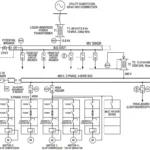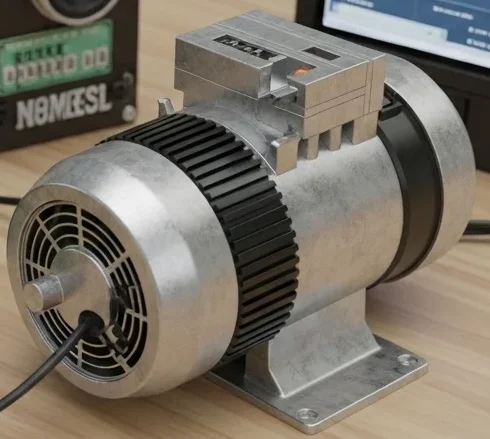

Imagine you are working on an important project on your computer, and suddenly the electricity goes out. Within seconds, your computer shuts down, unsaved data is lost, and your work is interrupted. In hospitals, data centers, and industrial plants, a power outage can cause much bigger problems, including equipment failure, financial losses, and safety risks. This is where a UPS becomes extremely important.
A UPS (Uninterruptible Power Supply) is a device that provides backup power when the main electrical supply fails. It ensures that critical equipment continues operating for a short period, allowing users to save data, safely shut down systems, or switch to an alternative power source. UPS systems are widely used in homes, offices, industries, hospitals, communication networks, and data centers.
For electrical students, engineers, technicians, and beginners, understanding UPS systems is essential because they play a key role in modern power protection. Learning how a UPS works helps in understanding power quality, battery systems, inverters, and backup power technologies.
In this article, you will learn what is UPS, the UPS working principle, types, components, applications, advantages and disadvantages, troubleshooting methods, and future developments in simple and practical language.
What is UPS?
A UPS (Uninterruptible Power Supply) is an electrical device that provides emergency backup power to connected equipment when the main power source fails or experiences voltage disturbances.
In simple words, a UPS acts like a temporary power reserve that keeps electrical devices running during power interruptions.
Unlike generators, which require time to start, a UPS provides power almost instantly.
Practical Example
Suppose a desktop computer is connected to a UPS. If the utility power fails, the UPS immediately supplies power from its battery, allowing the user to save files and shut down the computer safely.
UPS systems are commonly used for:
- Computers and servers
- Hospitals
- Industrial control systems
- Telecommunication equipment
- Security systems
- Data centers
UPS Working Principle
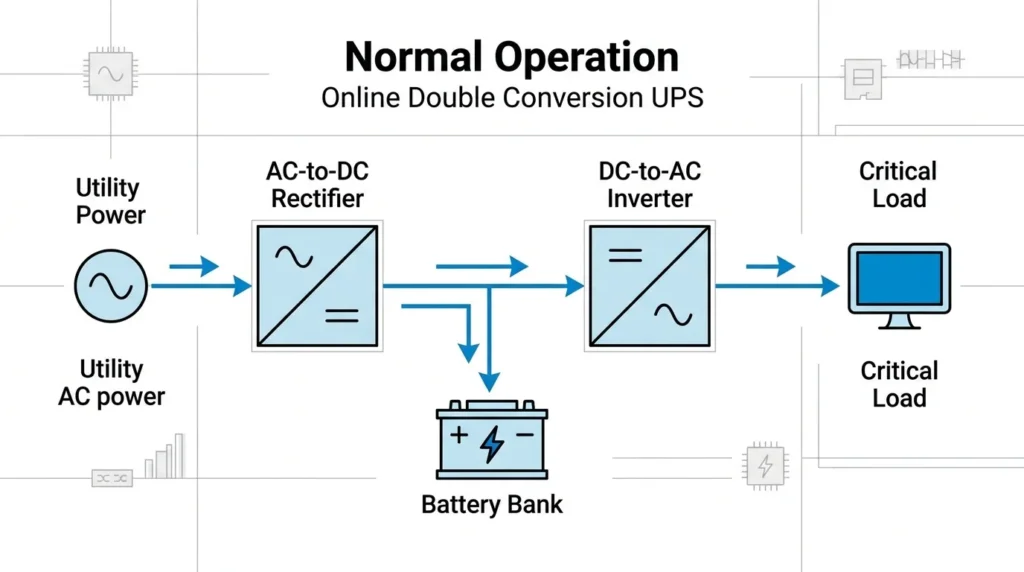
The UPS (Uninterruptible Power Supply) Working Principle is based on providing continuous electrical power to connected equipment during power outages, voltage fluctuations, or other electrical disturbances. Under normal operating conditions, the UPS receives AC power from the utility supply and uses a rectifier to convert it into DC power. This DC power charges the internal battery while also supplying an inverter. The inverter then converts the DC power back into clean and stable AC power for the connected load. If the main power supply fails or drops below a safe level, the battery instantly provides DC power to the inverter, which continues supplying AC power without interruption. This seamless switching protects sensitive equipment such as computers, servers, medical devices, communication systems, and industrial control equipment from shutdowns, data loss, and electrical damage. Modern UPS systems also provide protection against voltage spikes, surges, sags, and electrical noise, ensuring a reliable and uninterrupted power supply.
The UPS working principle involves storing electrical energy in batteries and supplying that energy to connected loads whenever the main power source becomes unavailable.
Simple Analogy
Think of a water tank connected to a building.
- When the city water supply is available, the tank fills up.
- If the water supply stops, the tank provides water temporarily.
A UPS works similarly by storing electrical energy in batteries and supplying it during power failures.
Step-by-Step UPS Working Principle
AC Power Enters the UPS
The UPS receives AC power from the utility supply.
Rectifier Converts AC to DC
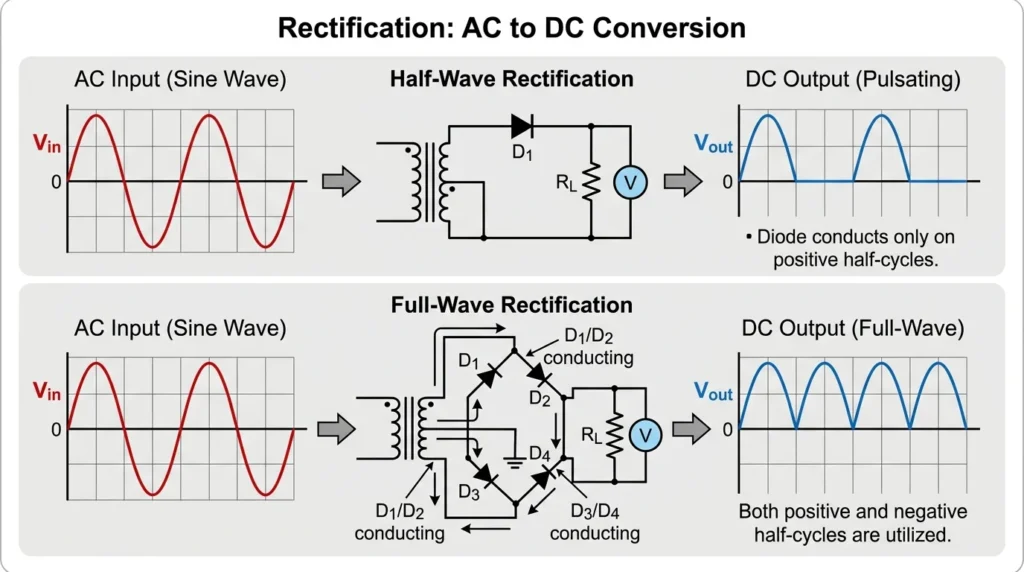
The rectifier is one of the most important components of a UPS because it converts the incoming alternating current (AC) from the utility power supply into direct current (DC). This DC power performs two essential functions: it charges the UPS battery and supplies the inverter with the DC voltage needed to produce a stable AC output. During normal operation, the rectifier continuously keeps the battery fully charged while providing a steady DC supply to the internal circuits. By converting AC to DC efficiently, the rectifier ensures that the UPS is always ready to deliver uninterrupted backup power whenever the main electrical supply fails or experiences voltage fluctuations.
The rectifier converts incoming AC power into DC power.
Functions
- Charges batteries
- Supplies the inverter
Batteries Store Energy
The battery bank stores electrical energy continuously.
Inverter Converts DC to AC
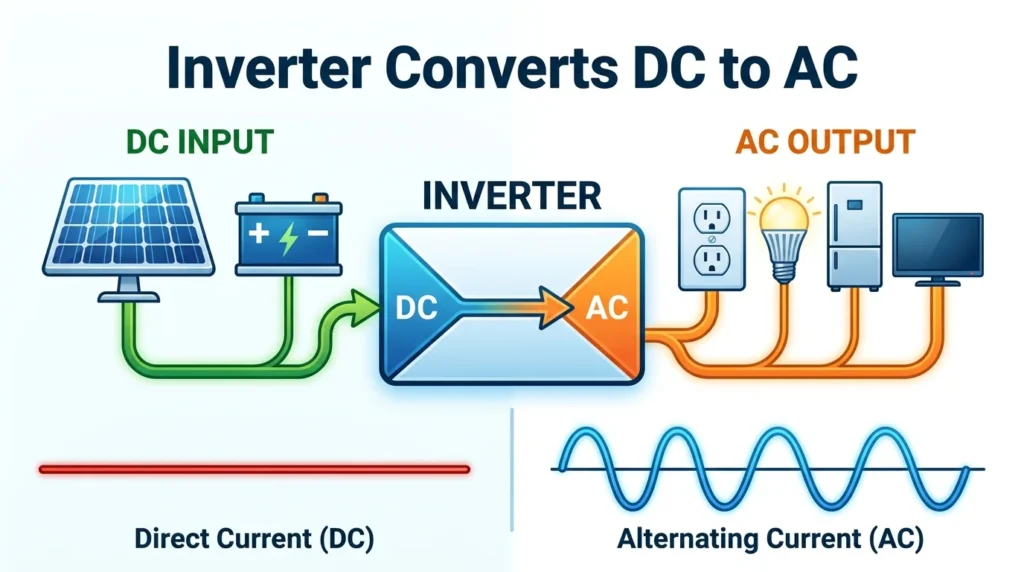
The inverter is a key component of a UPS that converts direct current (DC) from the battery or rectifier into alternating current (AC) to power connected electrical equipment. During normal operation, the inverter receives DC power from the rectifier, while during a power outage it receives DC power directly from the battery. It then converts this DC into a stable and clean AC output with the required voltage and frequency. This process ensures that sensitive devices such as computers, servers, medical equipment, and industrial control systems continue operating without interruption. A high-quality inverter also helps maintain consistent output voltage, reduces electrical noise, and protects connected equipment from power disturbances.
The inverter converts DC battery power back into AC power suitable for electrical loads.
Normal Operation
When utility power is available:
- Load receives power
- Batteries remain charged
Power Failure Occurs
When the main supply fails:
- UPS detects the outage
- Battery power is activated immediately
Load Continues Operating
The inverter supplies uninterrupted power to connected equipment.
Key Features of UPS Working Principle
- Instant backup power
- Voltage regulation
- Surge protection
- Battery energy storage
- Continuous operation of critical equipment
Types / Classification of UPS
UPS systems are classified according to their operating method and application.
Offline UPS (Standby UPS)
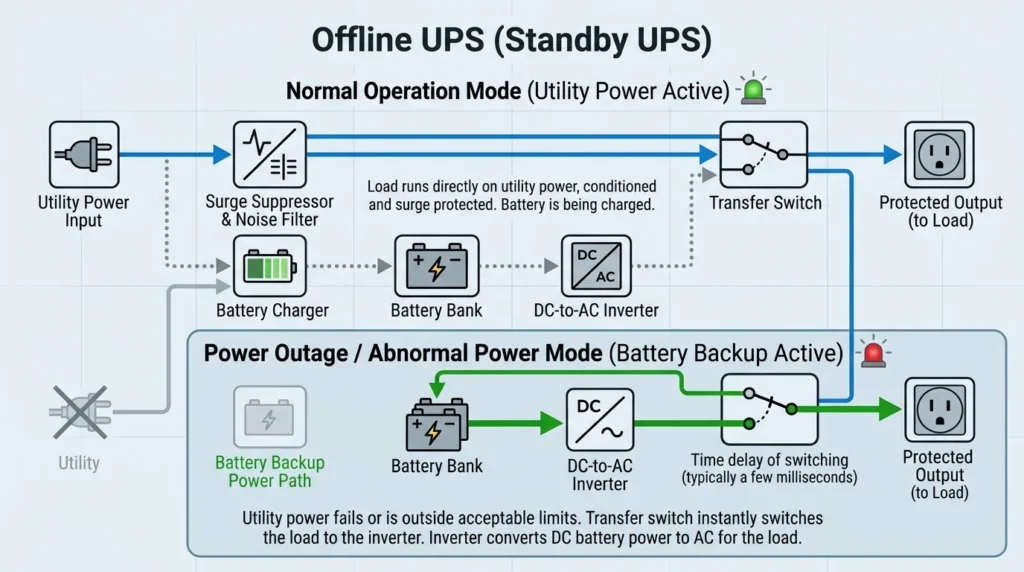
An Offline UPS (Standby UPS) is the simplest and most economical type of uninterruptible power supply. Under normal operating conditions, it supplies electricity directly from the main utility power to the connected devices while simultaneously charging its internal battery. When a power outage, voltage drop, or other electrical disturbance occurs, the UPS automatically switches to battery power through its inverter within a few milliseconds. This provides temporary backup power, allowing users to safely save their work and shut down equipment or continue operation for a short period. Offline UPS systems are commonly used for personal computers, home office equipment, routers, small networking devices, and other electronics that do not require continuous voltage regulation. They are popular because of their low cost, compact design, and easy maintenance.
This is the simplest and most economical UPS type.
Working Method
- Load receives power directly from utility supply.
- Battery operates only during power failure.
Advantages
- Low cost
- Simple design
Applications
- Home computers
- Small office equipment
Line-Interactive UPS
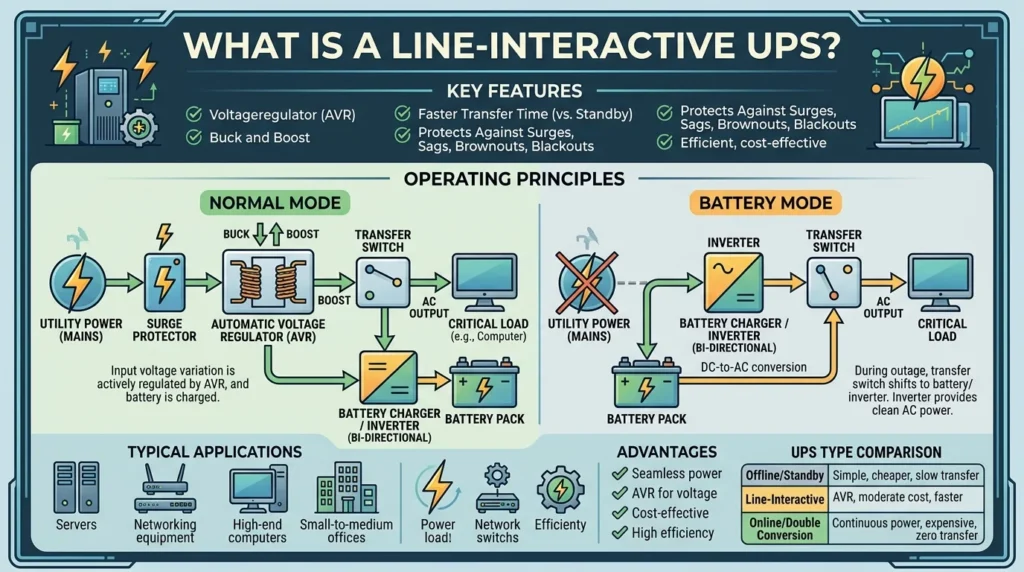
A Line-Interactive UPS is an advanced type of uninterruptible power supply that provides backup power while also regulating voltage fluctuations without frequently switching to battery mode. During normal operation, it supplies power directly from the utility source and uses an Automatic Voltage Regulator (AVR) to correct low or high input voltage. If the main power fails completely, the UPS automatically switches to its battery, and the inverter supplies continuous AC power to the connected equipment with minimal interruption. Compared to an Offline UPS, a Line-Interactive UPS offers better protection against voltage sags, surges, and brownouts, making it ideal for computers, servers, networking devices, small data centers, medical equipment, and office electronics. Its improved voltage regulation, higher efficiency, and longer battery life make it a popular choice for environments where power quality is important.
This UPS provides better voltage regulation.
Features
- Automatic voltage correction
- Improved protection
Applications
- Small servers
- Networking equipment
- Office systems
Online UPS
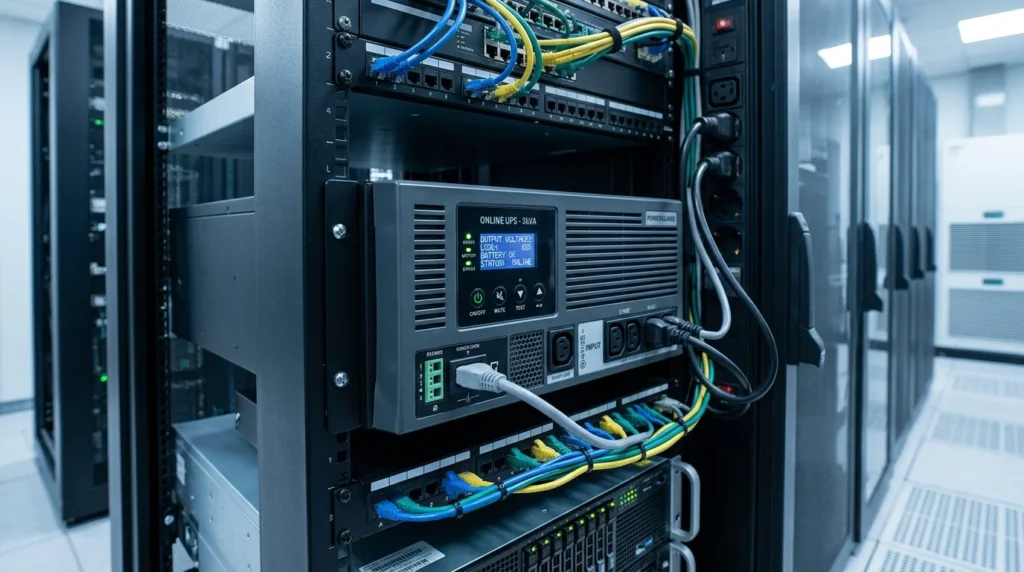
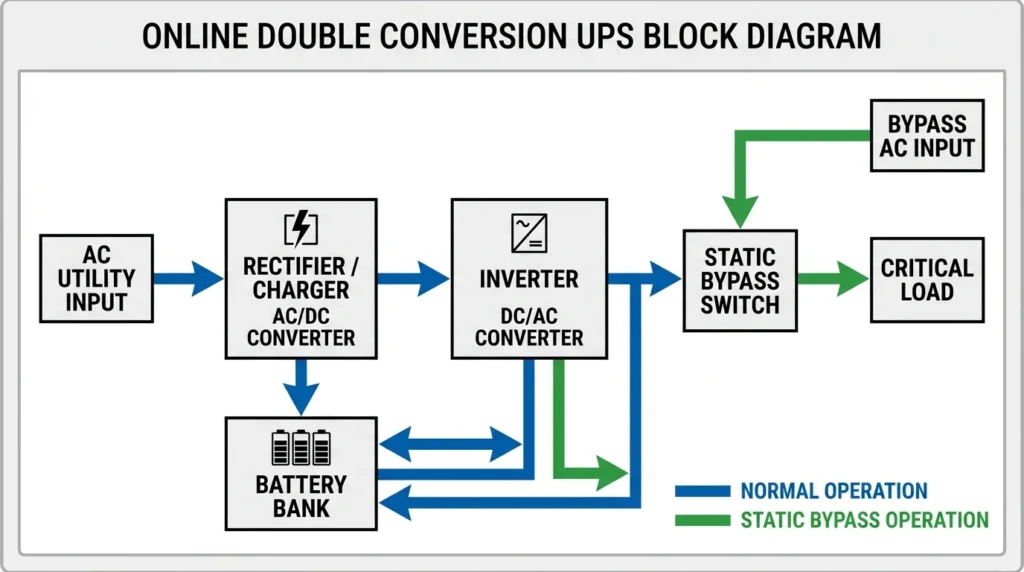
An Online UPS (Double-Conversion UPS) is the most advanced type of uninterruptible power supply, designed to provide continuous and high-quality electrical power to critical equipment. Unlike Offline and Line-Interactive UPS systems, an Online UPS always supplies power through its rectifier and inverter. The incoming AC power is first converted into DC by the rectifier, which charges the battery and feeds the inverter. The inverter then continuously converts the DC power back into clean, stable AC power for the connected load. Since the load is always powered by the inverter, there is no transfer time during a power outage. This ensures uninterrupted operation and excellent protection against voltage fluctuations, surges, spikes, frequency variations, and electrical noise. Online UPS systems are widely used in data centers, hospitals, telecommunications, industrial automation, banking systems, and other mission-critical applications where even a brief power interruption cannot be tolerated.
Online UPS provides the highest level of protection.
Working Method
- Load is always powered through the inverter.
Advantages
- Zero transfer time
- Excellent power quality
Applications
- Data centers
- Hospitals
- Critical industrial systems
Industrial UPS
Designed for harsh industrial environments.
Features
- High power capacity
- Robust construction
Applications
- Manufacturing plants
- Oil and gas facilities
Main Components of a UPS
Understanding UPS components helps technicians and students learn practical system operation.
Rectifier
Converts AC input into DC power.
Function
- Battery charging
- DC supply generation
Battery Bank
Stores electrical energy.
Function
- Provides backup power
Common Types
- Lead-acid batteries
- Lithium-ion batteries
Inverter
Converts DC into AC.
Function
- Supplies power during outages
Static Switch
Controls power flow automatically.
Function
- Enables fast transfer between power sources
Charger Circuit
Maintains battery charge.
Function
- Prevents battery discharge
Control Unit
Monitors UPS operation.
Function
- System protection
- Performance monitoring
Cooling System
Removes heat from UPS components.
Function
- Improves reliability
Advantages
Understanding UPS advantages and disadvantages helps users choose the correct system.
Advantages of UPS
- Provides uninterrupted power supply
- Protects against power outages
- Prevents data loss
- Improves equipment reliability
- Protects against voltage fluctuations
- Reduces downtime
- Provides surge protection
- Supports critical operations
Real-World Benefits
Data Protection
Users can save important files during power interruptions.
Improved Productivity
Work continues without sudden shutdowns.
Equipment Safety
Sensitive electronics receive stable power.
Reliable Industrial Operations
Critical systems remain operational during outages.
Disadvantages / Limitations
Like all technologies, UPS systems also have limitations.
Disadvantages of UPS
- Initial purchase cost
- Battery replacement expenses
- Limited backup duration
- Requires maintenance
- Occupies installation space
- Generates heat
Practical Limitations
Battery Life
Batteries gradually lose capacity over time.
Limited Backup Time
Most UPS systems provide backup for minutes rather than hours.
Higher Cost for Large Systems
Industrial UPS systems can be expensive.
UPS Applications
UPS applications continue growing across many industries.
Home Applications
- Desktop computers
- Wi-Fi routers
- Security systems
Office Applications
- Servers
- Networking equipment
- Communication systems
Industrial Applications
- Automation systems
- Manufacturing plants
- Process control systems
Healthcare Applications
- Medical equipment
- Operating rooms
- Diagnostic machines
Data Center Applications
- Servers
- Storage systems
- Cloud infrastructure
Telecommunication Applications
- Mobile networks
- Communication towers
- Internet infrastructure
UPS applications are essential wherever continuous electrical power is required.
Comparison Section
Difference Between UPS and Generator
| Feature | UPS | Generator |
| Startup Time | Instant | Requires several seconds |
| Power Source | Battery | Fuel |
| Noise Level | Very low | Higher |
| Maintenance | Moderate | Higher |
| Backup Duration | Short | Long |
| Fuel Requirement | No | Yes |
| Indoor Installation | Possible | Limited |
| Primary Purpose | Immediate backup | Extended backup |
Understanding the difference between UPS and generator helps users choose the proper backup solution.
Selection Guide
Choosing the correct UPS depends on application requirements.
Load Capacity
Calculate total equipment power requirements.
Backup Time
Determine how long equipment must remain operational.
UPS Type
- Offline UPS
- Line-interactive UPS
- Online UPS
Battery Technology
- Lead-acid batteries
- Lithium-ion batteries
Future Expansion
Select a UPS with additional capacity for future growth.
Tips for Beginners
- Always calculate load requirements first.
- Choose slightly higher capacity than current demand.
- Check battery replacement costs.
- Consider runtime requirements.
- Follow manufacturer maintenance recommendations.
Common Problems & Solutions
UPS Not Turning On
Causes
- Battery failure
- Input power issues
Solution
- Check battery condition
- Verify input connections
Battery Not Charging
Causes
- Faulty charger
- Battery aging
Solution
- Inspect charger circuit
- Replace batteries
Short Backup Time
Causes
- Battery deterioration
Solution
- Install new batteries
UPS Overheating
Causes
- Poor ventilation
- Overloading
Solution
- Improve airflow
- Reduce load
Frequent Alarm Activation
Causes
- Low battery
- System faults
Solution
- Check warning indicators
- Perform maintenance inspection
Future Trends
UPS technology continues evolving rapidly.
Lithium-Ion Battery UPS
Modern systems increasingly use lithium-ion batteries.
Benefits
- Longer life
- Faster charging
- Lower maintenance
Smart UPS Systems
Advanced UPS units include:
- Remote monitoring
- Mobile app control
- Predictive maintenance
IoT Integration
Sensors monitor:
- Battery health
- Load conditions
- System performance
Renewable Energy Integration
Future UPS systems will work closely with:
- Solar power systems
- Energy storage systems
- Smart grids
AI-Based Energy Management
Advanced software will optimize battery usage and improve reliability.
The future of UPS applications is closely linked with digital infrastructure, renewable energy, and intelligent power management systems.
Conclusion
A UPS (Uninterruptible Power Supply) is a critical device that provides immediate backup power during electrical outages and protects equipment from power disturbances. It helps ensure continuous operation of computers, servers, medical equipment, industrial systems, and other sensitive devices. By using batteries, rectifiers, and inverters, a UPS supplies clean and reliable power whenever the main supply becomes unavailable.
This article explained what is UPS, the UPS working principle, types, components, applications, advantages and disadvantages, troubleshooting methods, and future developments in simple and practical language. You also learned the difference between UPS and generator systems and how to select the right UPS for specific requirements.
For electrical students, engineers, technicians, and beginners, understanding UPS technology is essential because uninterrupted power has become a necessity in modern homes, industries, healthcare facilities, and digital infrastructure.