
Imagine a sudden power outage during a hot summer evening. The lights go OFF, fans stop working, and important devices like computers and Wi-Fi routers shut down immediately. In many homes and businesses, an inverter system solves this problem by providing backup electricity during power failures. Today, inverter systems are widely used because they offer reliable power backup, protect electronic equipment, and improve energy management.
Understanding the Inverter Installation Guide is very important for electrical students, engineers, technicians, and beginners because proper installation ensures safety, efficiency, and long-term system performance. Incorrect inverter installation may cause overheating, battery damage, electrical faults, or even fire hazards. A properly installed inverter system can efficiently power lights, fans, computers, refrigerators, and other essential appliances during outages.
The inverter installation guide working principle explains how DC power from batteries is converted into AC power for household and industrial use. Modern inverter systems are also used with solar panels, smart homes, and renewable energy systems.
In this article, you will learn everything about inverter installation, including working principles, types, components, installation methods, applications, advantages and disadvantages, troubleshooting, safety tips, and future technologies in simple and easy English.
What is Inverter Installation Guide?
An inverter installation guide is a complete procedure that explains how to safely install, connect, and operate an inverter system for backup power applications.
The guide includes:
Inverter selection
Battery connection
Wiring methods
Safety protection
Load calculation
Maintenance practices
Simple Explanation
An inverter converts DC electricity from batteries into AC electricity used by home appliances.
The installation process ensures that all components are connected safely and correctly.
Practical Example
A home inverter system may power:
LED lights
Ceiling fans
Television
Wi-Fi router
Computer
during a power outage.
Inverter Installation Guide Working Principle
The inverter installation guide working principle is based on converting stored DC battery power into usable AC electrical power.
Step-by-Step Working Process
AC Supply Charges the Battery
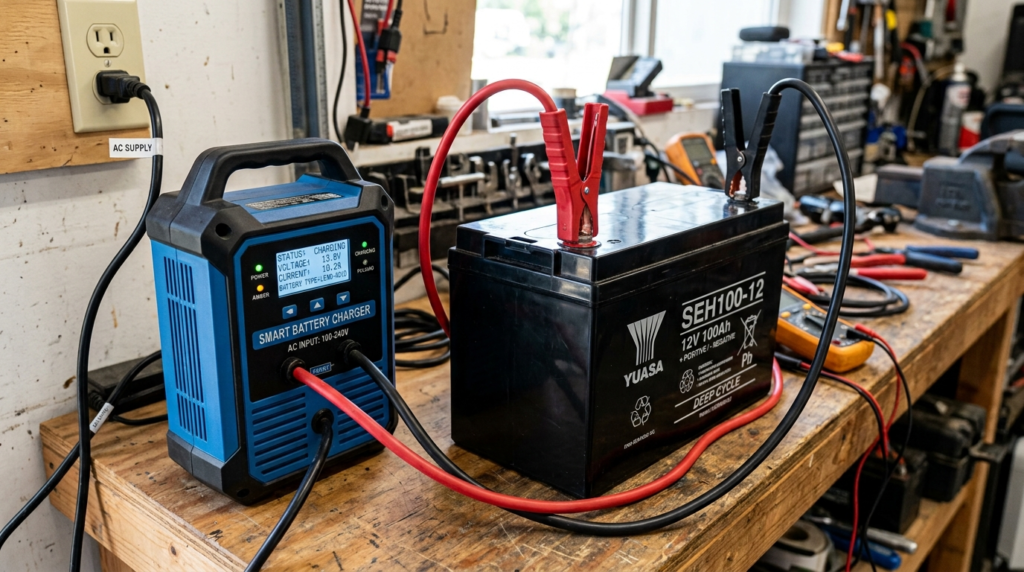
AC Supply Charges the Battery through a battery charger or rectifier that converts Alternating Current (AC) from the mains into Direct Current (DC), which is required for battery charging. Since batteries can only store DC power, the charger carefully controls the charging voltage and current to ensure safe and efficient charging. During the charging process, electrical energy from the AC supply is converted into chemical energy and stored inside the battery for future use. This charging method is widely used in UPS systems, inverters, electric vehicles, solar backup systems, emergency lighting, and portable electronic devices. A properly designed charger protects the battery from overcharging, overheating, and excessive current, helping to improve battery performance, extend its service life, and ensure reliable backup power whenever the AC supply is interrupted.
The utility power charges the inverter battery during normal operation.
Battery Stores Electrical Energy
The battery stores DC electrical energy for backup use.
Power Failure Occurs
When utility supply stops, the inverter automatically activates.
DC Power Enters the Inverter
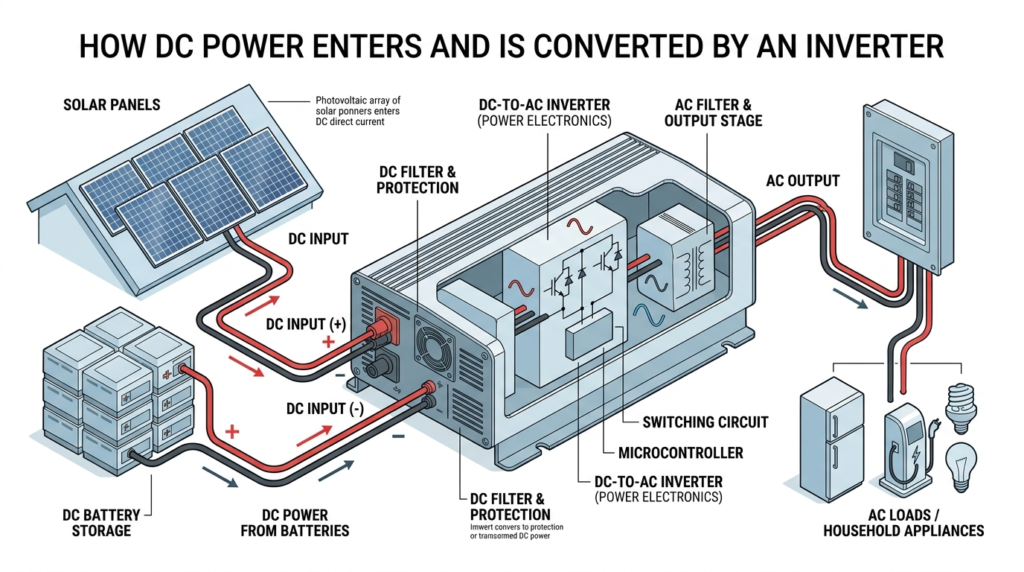
After the battery is charged, DC (Direct Current) power enters the inverter, where it is converted into AC (Alternating Current) to operate household appliances and electrical equipment. Since most home and office devices are designed to work on AC power, the inverter plays a vital role in changing the battery’s stored DC energy into usable AC electricity. During a power outage, the inverter automatically draws DC power from the battery and converts it into a stable AC output, ensuring an uninterrupted power supply. This process is widely used in UPS systems, home inverters, solar power systems, and backup power applications. A high-quality inverter provides efficient power conversion, minimizes energy losses, and delivers a stable output voltage, helping protect connected devices and extend battery life.
The inverter receives DC power from the battery.
Inverter Converts DC into AC
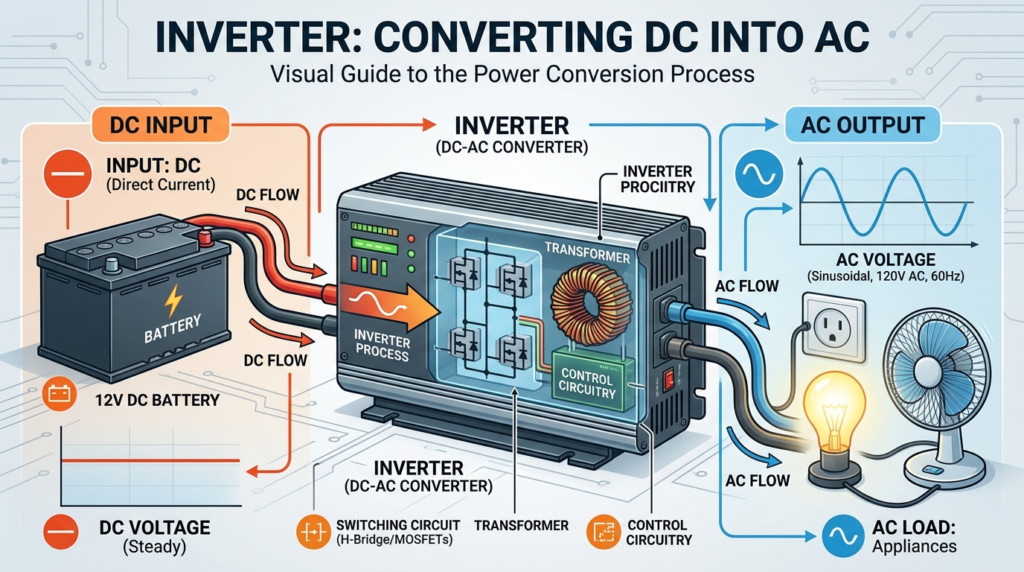
An inverter converts DC (Direct Current) into AC (Alternating Current) so that electrical appliances can operate using the energy stored in a battery. Batteries supply DC power, while most household and industrial equipment, such as fans, lights, televisions, computers, and refrigerators, require AC power. The inverter uses electronic switching circuits to change the DC voltage into a stable AC output with the required voltage and frequency. During a power outage, it automatically converts the battery’s DC power into AC, ensuring an uninterrupted electricity supply. This conversion process is essential in UPS systems, home inverters, solar energy systems, electric vehicles, and portable power stations. A high-quality inverter provides efficient power conversion, reduces energy losses, and delivers a reliable AC output to protect connected electrical devices.
Electronic switching circuits convert DC into AC output.
Appliances Receive Backup Power
The inverter supplies AC electricity to connected loads.
Inverter Power Formula
P = V \times I
Where:
P = Power
V = Voltage
I = Current
Easy Analogy
Think of the inverter like a language translator.
Batteries speak DC language
Home appliances understand AC language
The inverter translates DC into AC
Types / Classification
Different inverter systems are available depending on power requirements and applications.
Square Wave Inverter
Produces square-shaped output waveform.
Features
Simple design
Low cost
Lower efficiency
Applications
Small backup systems
Modified Sine Wave Inverter
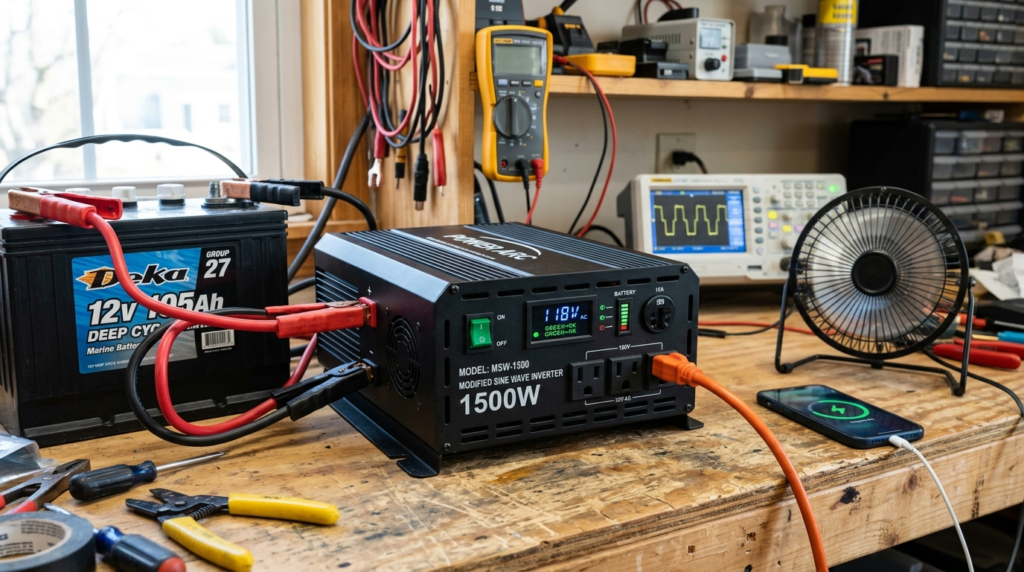
A Modified Sine Wave Inverter is a type of inverter that converts DC (Direct Current) from a battery into an AC (Alternating Current) output with a stepped waveform that closely resembles a pure sine wave. It is more affordable and simpler in design than a pure sine wave inverter, making it a popular choice for basic backup power applications. Modified sine wave inverters are suitable for operating lights, fans, televisions, chargers, and other non-sensitive electrical devices. However, they may not perform well with sensitive electronics, medical equipment, laser printers, or appliances that use induction motors, as the modified waveform can cause noise, reduced efficiency, or additional heat. Due to their lower cost and acceptable performance for everyday loads, modified sine wave inverters are widely used in home inverters, small UPS systems, and emergency backup power solutions.
Produces a partially smooth waveform.
Features
Moderate cost
Better appliance compatibility
Applications
Homes
Small offices
Pure Sine Wave Inverter
Produces clean AC output similar to utility power.
Features
High efficiency
Safe for sensitive electronics
Applications
Computers
Medical equipment
Modern homes
Solar Inverter
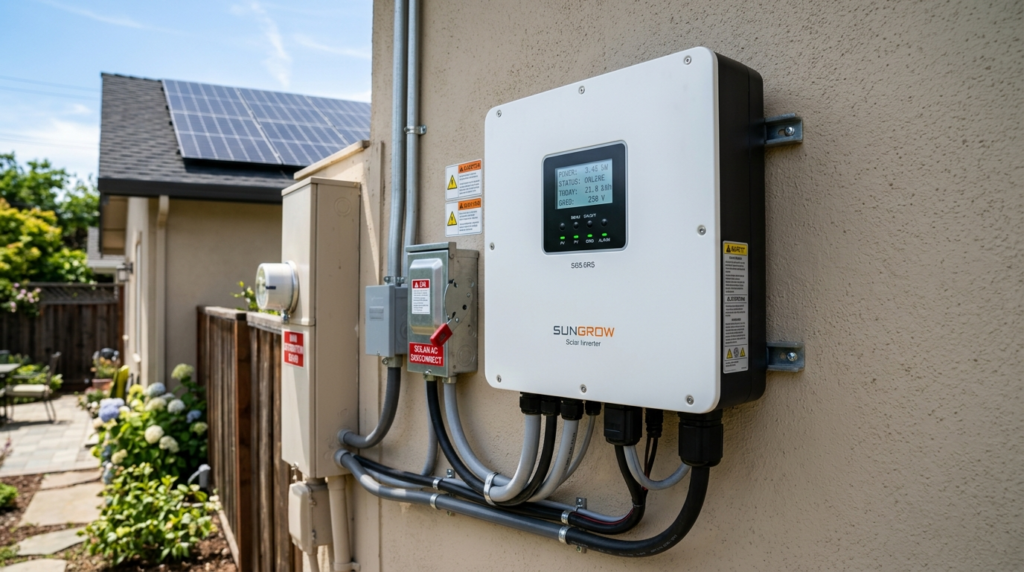
A Solar Inverter is an essential device in a solar power system that converts the Direct Current (DC) electricity generated by solar panels into Alternating Current (AC), which is used by household appliances, commercial buildings, and industrial equipment. It also monitors the performance of the solar system, regulates voltage, and ensures efficient and safe power conversion. Many modern solar inverters include advanced features such as Maximum Power Point Tracking (MPPT), battery charging, grid synchronization, and remote monitoring to maximize energy production. Solar inverters are widely used in residential rooftop solar systems, commercial solar installations, off-grid systems, hybrid solar systems, and large solar power plants. Their high efficiency, reliable performance, and ability to optimize solar energy make them a key component of renewable energy systems and sustainable electricity generation.
Works with solar panel systems.
Features
Renewable energy support
Smart energy conversion
Applications
Solar homes
Commercial solar systems
Hybrid Inverter
Combines battery, solar, and utility supply management.
Features
Advanced power control
Backup operation
Applications
Smart homes
Industrial systems
Main Components
Several important parts are required for proper inverter installation.
Inverter Unit
Main device that converts DC into AC power.
Battery Bank
Stores electrical energy for backup operation.
Common Battery Types
Lead-acid battery
Lithium-ion battery
Charging Circuit
Charges the battery during normal utility supply.
Input and Output Wiring
Transfers electrical power safely.
Protection Devices
Protect the system from faults and overloads.
Examples
Fuse
Circuit breaker
Surge protector
Cooling System
Prevents overheating during operation.
Examples
Cooling fan
Heat sink
Changeover Switch
Transfers load between utility supply and inverter supply.
Advantages
Understanding inverter installation guide advantages and disadvantages helps users make better decisions.
Advantages of Inverter Installation
Provides backup power
Protects electronic equipment
Supports uninterrupted operation
Improves energy management
Reduces downtime
Quiet operation
Fast automatic switching
Supports solar systems
Low maintenance
Suitable for homes and industries
Disadvantages / Limitations
Although highly useful, inverter systems also have limitations.
Disadvantages of Inverter Installation
High initial cost
Battery replacement expense
Limited backup duration
Overloading may damage the inverter
Heat generation during operation
Requires regular battery maintenance
Large systems require more installation space
Inverter Installation Applications
Inverter installation applications are common in modern electrical systems.
Home Applications
Lighting systems
Fans
Refrigerators
Computers
Commercial Applications
Offices
Shops
Banking systems
Industrial Applications
Automation systems
Emergency backup systems
Control panels
Renewable Energy Applications
Solar power systems
Hybrid energy systems
Modern Technology Applications
Smart homes
Data centers
Electric vehicle charging
Comparison Section
Difference Between UPS and Inverter
| Feature | UPS | Inverter |
| Switching Time | Very fast | Slight delay |
| Backup Purpose | Sensitive electronics | General backup |
| Battery Capacity | Smaller | Larger |
| Cost | Higher | Lower |
| Output Quality | Very stable | Depends on inverter type |
| Applications | Computers, servers | Homes, offices |
| Backup Duration | Short | Longer |
Selection Guide
Choosing the correct inverter system improves performance and safety.
Calculate Total Load First
Determine the total wattage of appliances.
Choose Proper Battery Capacity
Battery size determines backup duration.
Select Pure Sine Wave Inverters When
Sensitive electronics are used.
Use Solar Inverters When
Renewable energy integration is required.
Check Safety Features
Choose systems with:
Overload protection
Short circuit protection
Low battery protection
Tips for Beginners
Install in Ventilated Areas
Good airflow prevents overheating.
Use Proper Cable Size
Correct cable size reduces voltage loss.
Avoid Overloading
Excessive load may damage the inverter.
Maintain Batteries Regularly
Proper maintenance increases battery lifespan.
Follow Electrical Safety Rules
Always disconnect power before wiring.
Common Problems & Solutions
Why Is the Inverter Not Starting?
causes:
Battery disconnected
Fuse blown
Low battery voltage
Solution
Check battery terminals
Replace fuse
Recharge battery
Why Is Backup Time Low?
causes:
Weak battery
Excessive load
Solution
Replace battery
Reduce load
Why Is the Inverter Overheating?
causes:
Poor ventilation
Overloading
Solution
Improve airflow
Reduce connected appliances
Why Is the Battery Not Charging?
causes:
Faulty charger
Loose connection
Solution
Check charging circuit
Tighten terminals
Why Is Output Voltage Unstable?
causes:
Damaged inverter circuit
Battery problem
Solution
Inspect inverter electronics
Test battery condition
Future Trends
Modern inverter technology continues improving rapidly.
Smart Inverters
Modern inverters now include:
Wi-Fi monitoring
Mobile app control
Remote diagnostics
AI-Based Energy Management
Artificial intelligence improves energy efficiency and battery performance.
Solar Hybrid Systems
Hybrid systems combine:
Solar energy
Battery storage
Utility supply
for better energy management.
Lithium Battery Integration
Lithium batteries provide:
- Longer lifespan
- Faster charging
- Lower maintenance
IoT-Based Monitoring
Internet-connected inverters improve fault detection and energy analysis.
High-Efficiency Power Electronics
Modern semiconductor technology reduces power losses and improves efficiency.
Conclusion
An inverter system is an essential part of modern electrical backup solutions for homes, offices, industries, and renewable energy systems. Proper installation ensures reliable operation, improved electrical safety, and efficient power management during utility failures.
The inverter installation guide working principle explains how stored DC battery power is converted into AC power for operating household and industrial appliances. Understanding inverter installation applications, advantages and disadvantages, protection methods, and troubleshooting techniques helps electrical students, engineers, technicians, and beginners develop strong practical and technical knowledge.
As technology continues advancing, smart inverters, solar hybrid systems, lithium battery storage, and AI-based energy management will make inverter systems more efficient, intelligent, and environmentally friendly in the future.